
Before you start
Get the original file if you can, not a screenshot of it. Credentials are attached to the file itself, so a screenshot is a new file without them. For the command line you need a terminal, and on macOS a copy of Homebrew.
Read a file's marks in four steps
# the usage document's example file: put your own file's path in place of sample/C.jpg
c2patool -h
c2patool sample/C.jpg
c2patool sample/C.jpg -d
c2patool sample/C.jpg --info
c2patool sample/C.jpg --tree
c2patool sample/C.jpg --certs- Open Verify, the Content Authenticity Initiative's checking site, at verify.contentauthenticity.org and give it the file. The site's README says its code uses the c2pa.js library, which reads and validates C2PA data in the browser with WebAssembly.
- Or use c2patool, a command line tool for C2PA manifests. On macOS run
brew install c2patool. On other systems download a prebuilt binary from its Releases page and copy it to a folder on your PATH. The commands are in the next block. - For a picture an AI tool may have made, open synthid.com. Google DeepMind's post names synthid.com as the place to check whether online content came from Google AI or from the tools of partners such as OpenAI and NVIDIA.
- Read the result as a record and not a verdict: who signed it, what edits it lists and whether the tool reports a problem.
What each c2patool command prints
The tool's usage document describes each command. A manifest is the signed record inside the file, and the manifest store is the set of them. The plain command prints the manifest as JSON, a text format of labeled fields.
If c2patool cannot validate any of the claims against its trust lists, the JSON output carries a validation_status field, an array of objects that each describe one problem. The documentation's own sample image shows signingCredential.untrusted, because the test certificate that signed it is not on the trust lists. So that status means the signing certificate is not on a list the tool knows. The document also says c2patool init trust turns trust checks on for later runs.
| Command | What it does |
|---|---|
| c2patool sample/C.jpg | Displays the manifest JSON on standard output |
| -d | Displays the detailed report, and saves it as detailed.json if you name an output folder |
| --info | Prints a high-level report: the size of the manifest store, the number of manifests and whether the manifest validated |
| --tree | Displays a text tree of the manifest store, showing assertions and nested ingredients |
| --certs | Extracts the certificate chain from the active manifest's signature and prints it |
What each mark can and cannot show
Content Credentials are, in Wikipedia's words, tamper-evident metadata packages cryptographically bound to digital media files. They record where a file came from and how it was edited. Their standard, C2PA, comes from the Coalition for Content Provenance and Authenticity, an open standards body that Adobe, Arm, the BBC, Intel, Microsoft and Truepic founded in February 2021.
SynthID is a watermark, a pattern placed in the content itself and not in a label beside it. Google DeepMind says its detector finds the watermarks in video, audio and images even after edits such as filters.
Wikipedia reports that these methods cannot say whether content is true. Metadata shows an origin, and trust depends on the source. It also reports that typical signing tools do not verify that the metadata is accurate, so a credential is only as good as its signer.
| C2PA Content Credentials | SynthID watermark | |
|---|---|---|
| Where it lives | In the file's signed metadata | Inside the picture, audio or video |
| What a check reports | Where the file came from and how it was edited | Whether it came from Google AI or a partner's tools |
| After a copy or an edit | Experts have documented ways to alter it, Wikipedia says | Found even after edits such as filters, Google DeepMind says |
| A public tool to check a file | Yes | Yes |
| Proves the content is true | No | No |
| A missing mark proves the file is human-made | No | No |
Sources: Wikipedia: Content Authenticity Initiative (read November 6, 2026), Google DeepMind on X, 7 October 2026 (read November 6, 2026), Google DeepMind on X, 7 October 2026, reply (read November 6, 2026), Wikipedia: SynthID (read November 6, 2026)
How the marks reached everyday tools
The Wikipedia article on SynthID adds that Google provides a detection API for its SynthID watermarks and its C2PA data. The four dates below are the ones we could source from pages we read.
C2PA is founded
An open standards body with six founding members, among them Adobe, the BBC and Microsoft.
Source: Wikipedia: Content Authenticity Initiative (read November 6, 2026)
Google announces a SynthID detector
Wikipedia dates the announcement of a SynthID based detector to May 2025.
Source: Wikipedia: SynthID (read November 6, 2026)
OpenAI adds SynthID to its images
OpenAI says its images carry C2PA credentials and a SynthID watermark and can be checked with a public tool.
Source: OpenAI on X, 19 May 2026 (read November 6, 2026)
SynthID Detector opens to everyone
Google DeepMind says anyone can check content made with Google AI or partners' tools.
Source: Google DeepMind on X, 7 October 2026 (read November 6, 2026)
What OpenAI and Google DeepMind say about their marks
OpenAI wrote on X on 19 May 2026 that its images now carry a SynthID watermark as well as C2PA Content Credentials. Its images, the post says, can be identified using a public verification tool. X cuts the post short, and we could not open the announcement page it links to, so this lesson relies on the visible text of the post alone.
Google DeepMind announced on 7 October 2026 that SynthID Detector is available to everyone. Kakao is on its list of partners beside OpenAI and NVIDIA, with Apple coming soon. A reply in the same thread makes the claim that matters most for a picture that has been passed around.
even after edits, like adding filters
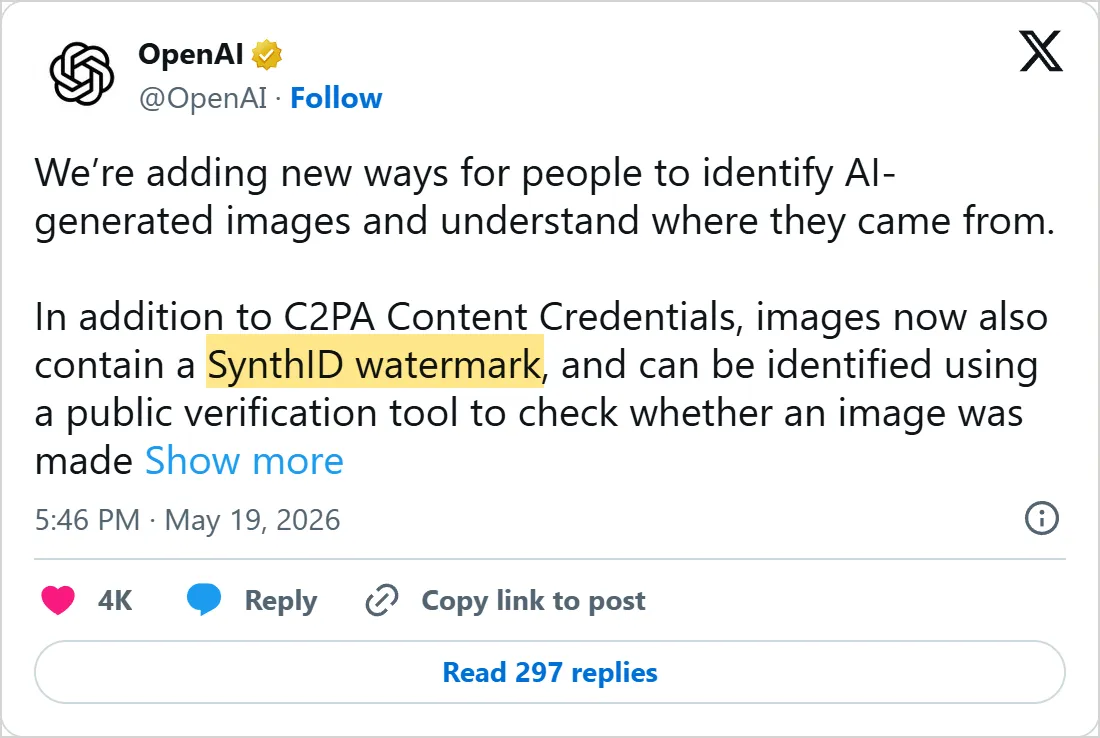
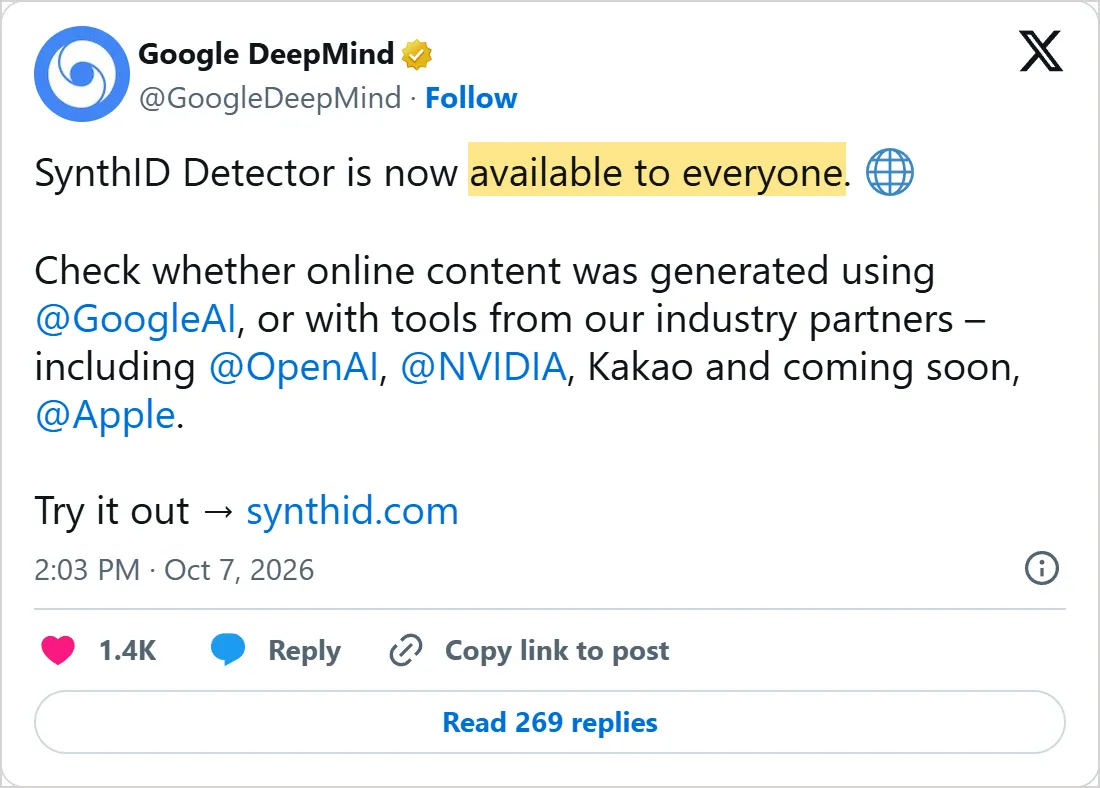
Screenshots of X's own embeds of the posts, taken on 6 November 2026, with the time in UTC. X cuts OpenAI's post short with Show more. Select one to open the post on X.
Common mistakes
- Reading "no credentials found" as "AI-generated" or as "fake". Wikipedia says attackers can bypass C2PA's safeguards, and a tool that adds no credential leaves nothing to find. A missing credential tells you nothing.
- Reading "credentials found" as "true". The record shows origin and edits, and nothing in it checks the scene itself.
- Treating an untrusted signer as a forger. The status describes the signing certificate, so it says nothing by itself about what the picture shows.
- Checking a screenshot in place of the file. Credentials are bound to the file, and a screenshot is a new one.
- Using one detector for every maker. SynthID Detector covers Google's watermarks and those of the partners the post names.
Try it yourself
- Install c2patool and run the plain command on a picture from a tool that says it adds Content Credentials. Then run it on a screenshot of the same picture and compare what each prints.
- Give the same two files to Verify and see whether it agrees with c2patool.
- Give a picture from an image tool of Google or OpenAI to the SynthID Detector, and write down whether it names a maker.
Next: how scammers use AI
Marks help with files. Scams arrive as messages, calls and apps, with no file to read. Lesson 4 covers how scammers use AI, what vendors' threat reports found and how to protect yourself.
Check yourself
What do Content Credentials record?
Show answer
B. Where a file came from and how it was edited Wikipedia describes them as tamper-evident metadata that records a file's provenance, attribution and editing history.
Which c2patool option prints a text tree of a file's manifest store?
Show answer
C. --tree The usage document says --tree displays a text tree diagram of the manifest store, showing assertions and nested ingredients.
A file shows no Content Credentials and no SynthID watermark. What can you conclude?
Show answer
D. Nothing about how it was made Wikipedia reports attackers altering provenance metadata and removing or forging watermarks, and a SynthID check covers only the makers that use it, so a missing mark proves nothing.
What does signingCredential.untrusted in c2patool's output mean?
Show answer
A. The signing certificate is not on the trust lists the tool uses The usage document's sample shows it because the test certificate that signed the sample is not on the trust lists.
Frequently asked questions
Do I need to install anything to check Content Credentials?
Not for Verify, whose README says it reads and validates the data in your browser. c2patool does need an install, either Homebrew on macOS or a downloaded binary placed on your PATH. For SynthID Detector, Google DeepMind's post says only that it is available to everyone at synthid.com. The pages we read do not say whether it asks you to sign in, so look at the site.
Who controls Content Credentials?
The standard comes from C2PA, an open body, while the Content Authenticity Initiative that builds the open-source tools is an Adobe business unit, according to Wikipedia. The same article says development of the open-source tools is driven almost entirely by Adobe, under a single-vendor governance model.
What is SynthID?
SynthID is Google's watermarking method. Wikipedia says a 2024 Google paper introduced it for text and described the first production deployment of generative text watermarking, in Gemini. The detector Google DeepMind announced covers video, audio and images too.
Can Content Credentials be removed?
Yes. Wikipedia reports that experts have documented attackers altering provenance metadata and removing or forging watermarks. A missing credential therefore still proves nothing.
Can I check an OpenAI image myself?
OpenAI's post points to a public verification tool for its images, and Google DeepMind's post lists OpenAI among the partners whose tools SynthID Detector covers. We could not open OpenAI's announcement page, so we cannot describe what its tool checks.
Does a SynthID watermark survive rewriting?
For text, not reliably. Hugging Face's post on SynthID Text says detector confidence can fall greatly when a text is thoroughly rewritten or translated, and that the method is not built to stop motivated adversaries.
Sources
- GitHub: contentauth/c2patool README https://github.com/contentauth/c2patool
- GitHub: c2patool, Using C2PA Tool https://github.com/contentauth/c2patool/blob/main/docs/usage.md
- GitHub: contentauth/c2pa-rs README https://github.com/contentauth/c2pa-rs
- GitHub: contentauth/verify-site README https://github.com/contentauth/verify-site
- Wikipedia: Content Authenticity Initiative https://en.wikipedia.org/wiki/Content_Authenticity_Initiative
- Wikipedia: SynthID https://en.wikipedia.org/wiki/SynthID
- Hugging Face blog: Introducing SynthID Text, 23 October 2024 https://huggingface.co/blog/synthid-text
- OpenAI on X, 19 May 2026 https://x.com/OpenAI/status/2056793648571011232
- Google DeepMind on X, 7 October 2026 https://x.com/GoogleDeepMind/status/2107834249680499136
- Google DeepMind on X, 7 October 2026, reply https://x.com/GoogleDeepMind/status/2107834254222581862