
Before you start
You need a Claude account, on the web, the desktop app or the phone. Projects come with every plan, the free one included.
Two terms come up. Knowledge is the set of files you add to a project, and Claude uses them in every chat there. The context window is how much text Claude can take in at once. On paid plans, when a project's knowledge nears that limit, Claude turns on RAG, short for retrieval-augmented generation, a way of looking up the passages a question needs instead of reading everything. Anthropic's projects page says it expands capacity by up to 10 times.
The steps and menu names follow Anthropic's help center as it read on 5 November 2026. If you want the mechanics of retrieval, the RAG tutorial builds a small version by hand.
Set up a project in five steps
Pick one job you repeat, such as a newsletter or a client's weekly report. The instructions below are our own example for a small bakery. Swap in your business and keep the shape: who reads it, the tone, and where the facts come from.
You help me write the monthly email newsletter for a small bakery.
Readers are regular customers. Keep a warm, plain tone and paragraphs of two or three sentences.
Take prices and opening hours only from the files in this project.
If a fact is not in the files, ask me instead of guessing.- Open Projects. Find it on the left side of Claude, or go to claude.ai/projects, and click + New Project in the upper right.
- Name it and describe it. Both are for you. Claude cannot see the name or the description, so nothing it needs goes there.
- Write the instructions. Click Set project instructions, paste your text and click Save instructions.
- Add knowledge. In the knowledge base on the right of the project page, click + and upload documents, text files or code.
- Chat inside the project. Start a new chat from the project page. To bring in an older chat, click the dropdown arrow next to its name, choose Add to project and pick the project in the Move chat window.
What Claude reads in a project
Chats inside one project do not share what was said in them. Agree on a new price in Monday's chat, and Tuesday's chat will not know it unless you add it to the knowledge base. Keeping those files current is most of the upkeep a project needs.
Memory fills part of that gap. Claude saves it as separate topics while you chat, and each project has its own. A project also draws on the memory from your chats outside any project, never on another project's. For a client whose details must stay sealed, turn off Use account memory on that project's page.
Memory is on by default on the Free, Pro, Max and Ultra plans. On Team and Enterprise, where the owners decide whether it is available, it stays off for each member until they turn it on. Anthropic's memory page puts the list under Settings, Your Claude: select Manage next to Your memory, then edit or delete any topic.
Projects
Chats can be grouped into shareable projects, each with its own large context window.
Source: Anthropic (@AnthropicAI) on X: Projects launch (read November 5, 2026)
Project sharing
Permissions and sharing arrive for Team and Enterprise plans.
Source: Anthropic: Claude release notes (read November 5, 2026)
Memory on Max and Pro
Max users get memory first, and Pro follows over about two weeks.
Source: Anthropic: Claude release notes (read November 5, 2026)
Memory for everyone
Memory from chat history reaches every Claude user, free accounts included.
Source: Anthropic: Claude release notes (read November 5, 2026)
Memory in Cowork
Memory works across chat and Cowork in the cloud, and you can edit or delete each topic.
Source: Anthropic: Claude release notes (read November 5, 2026)
Cowork in every chat
What Cowork does becomes available from any conversation, with your projects carried over. It rolls out gradually to Pro and Max.
Source: Anthropic: Claude release notes (read November 5, 2026)
| Layer | Where to set it | Reaches | Use it for |
|---|---|---|---|
| Instructions for Claude | Your initials at the lower left, then Settings, Your Claude | Every conversation | How you like answers, the terms you use |
| Project instructions | Set project instructions, on the project page | Chats in that project | The job's readers, tone and rules |
| Project knowledge | The + button in the knowledge base | Chats in that project | Price lists, past reports, style samples |
| Memory | Saved by Claude as you chat, managed in Settings, Your Claude | Your chats, with one memory per project | Details you would otherwise repeat |
Artifacts: what Claude makes for you
When Claude writes something long and self-contained, typically over 15 lines, it opens beside the chat as an artifact. Anthropic defines one as anything Claude makes for you that you would put in front of someone: a document, a diagram, a dashboard, a one-page website or a small interactive tool.
They need one setting, Cloud code execution and file creation, under Settings, then Capabilities. Every plan has them, Free included, and each one starts private to you.
To change one, ask Claude, or highlight text in a document, click Edit with Claude and describe the change. Export sends a document to Word, PDF, Markdown or Google Docs, and a slide deck to PowerPoint, PDF or Google Slides.
Some artifacts call Claude themselves and work as small apps. Each person who opens one signs in with their own Claude account and spends their own plan's usage, so you never hand out an API key.
How Anthropic introduced Projects on X in 2024
Anthropic introduced Projects on X on 25 June 2024. The post made two promises: chats grouped into projects you could share, and a 200K context window in each, with room for the documents, code and files the work needs.
Both have grown since. Claude's release notes record project permissions and sharing for the business plans from August 2025. The window is no longer the ceiling on paid plans either, because retrieval takes over when a project's knowledge nears the limit.
What has not changed is the idea of one project per job. Give each client or report a project of its own, and keep its knowledge to the files that job needs.
You can now organize chats with Claude into shareable Projects.
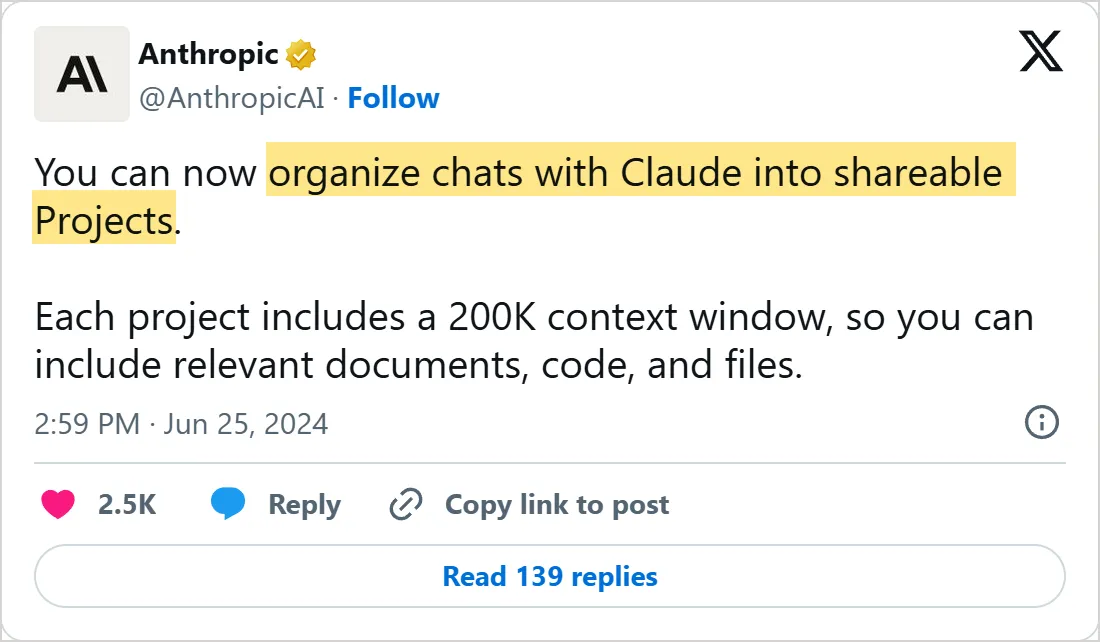
A screenshot of X's own embed of the post, taken on 5 November 2026, with the time in UTC. Select it to open the post on X.
Common mistakes
- Leaving last year's price list in the knowledge base. Claude uses every file there, so remove the old version when you upload a new one.
- Switching memory off once a chat is under way. The Memory switch in the + menu works only before your first message.
- Asking something private in a normal chat. An incognito chat, from the ghost icon at the upper right, stays out of your history and your memory.
Try it yourself
- Build the bakery project with your own business in it, then ask for next month's newsletter.
- In a second chat, ask about something you settled in the first one. If Claude has no idea, put that fact in a knowledge file and ask again.
- Read the topics Claude has saved about you, and delete one that is out of date.
- Export one artifact to Word and look at what came through.
Next: NotebookLM
Claude answers from your project files and from its own training. The NotebookLM tutorial works the other way round: Google's notebook answers only from the sources you add and quotes the passage behind each claim, which makes checking a fact a single click.
Check yourself
Where do you put the rules every chat in a Claude project should follow?
Show answer
B. In Set project instructions Claude cannot see a project's name or description, while project instructions apply to every chat in that project.
You agreed a new price in one chat of a project, and the next chat there does not know it. Why?
Show answer
A. Chats in a project do not share what was said unless it is in the knowledge base Context is not shared across project chats, so a decision has to be added to the knowledge base to reach the next chat.
A client's project should ignore what Claude remembers from your other chats. What do you turn off?
Show answer
D. Use account memory, on that project's page A project draws on your non-project memory unless Use account memory is off on its page.
You want the newsletter Claude wrote as a Word file. What do you click?
Show answer
C. Export Export sends a document artifact to Word, PDF, Markdown or Google Docs.
Frequently asked questions
Are Claude Projects free?
Yes, within a limit. A free account can create up to five projects. Paid plans also get the retrieval mode that keeps a large knowledge base usable.
Can I share a Claude project with my team?
Sharing comes with Team and Enterprise. Open the project, click Share project, add people by name or email and give each Can view or Can edit, then click Share. Can edit lets them change the instructions and knowledge and manage members.
What goes in project instructions and what goes in knowledge?
Rules go in the instructions, material in the knowledge. "Short paragraphs, ask before guessing" is an instruction, and the price list is knowledge.
Can I delete a Claude project I archived?
Not while it is archived. Unarchive it first from the three dots menu, then choose Delete and Yes, delete. Archiving keeps the chats, the members and the sharing settings as they were.
Sources
- Anthropic: What are projects? https://support.claude.com/en/articles/9517075-what-are-projects
- Anthropic: How can I create and manage projects? https://support.claude.com/en/articles/9519177-how-can-i-create-and-manage-projects
- Anthropic: What are artifacts and how do I use them? https://support.claude.com/en/articles/9487310-what-are-artifacts-and-how-do-i-use-them
- Anthropic: Use Claude's chat search and memory to build on previous context https://support.claude.com/en/articles/11817273-use-claude-s-chat-search-and-memory-to-build-on-previous-context
- Anthropic: Understanding Claude's personalization features https://support.claude.com/en/articles/10185728-understanding-claude-s-personalization-features
- Anthropic (@AnthropicAI) on X: Projects launch https://x.com/AnthropicAI/status/1805616725733339199
- Anthropic: Claude release notes https://support.claude.com/en/articles/12138966-release-notes