
Before you start
Nothing to install. Two ideas from earlier lessons carry over: a system prompt tells an agent how to behave, and the context window is the room it works in. If you have Claude Code you can watch a real agent loop, but reading is enough.
Tell an agent from a chatbot with three questions
Product names will not settle it, so ask these questions in order. The sketch below is ours. It follows OpenAI's description of the Agents SDK loop, which runs until a final-output tool is called or the model answers without a tool call.
messages = [instructions, user_request]
while True:
    reply = ask_model(messages, tools)
    if reply has no tool call:
        return reply              # a plain answer ends the run
    result = run_tool(reply.tool_call)
    messages += [reply, result]   # the result feeds the next step
# also stop when a step limit is reached- Who picks the next step? In a workflow, your code does. Anthropic's article defines workflows as systems where models and tools are orchestrated through predefined code paths, and agents as systems where the model dynamically directs its own process and tool use.
- What can it touch outside the chat? OpenAI says an agent has tools to interact with external systems, both to gather context and to take actions. A system that only returns text is not doing that.
- How does it know it is done? At each step it checks what came back from the environment, which Anthropic calls "ground truth", such as a tool result. The run ends when the task is complete or a limit is hit.
Chatbot, workflow or agent
Judge a product by the three questions, not by its label, since many chat products now add tools and drift toward the agent column. The table uses Anthropic's split between workflows and agents, plus OpenAI's remark that simple chatbots, single-turn models and sentiment classifiers are not agents.
| Plain chatbot | Workflow | Agent | |
|---|---|---|---|
| A language model writes text | Yes | Yes | Yes |
| The model chooses the next step | No | No | Yes |
| Calls tools or APIs that act outside the chat | No | Yes | Yes |
| Checks the result of each action and tries again | No | Partly | Yes |
Sources: Anthropic Engineering: Building effective agents (read November 4, 2026), OpenAI: A practical guide to building agents (read November 4, 2026)
Model, tools and instructions
OpenAI's guide says an agent has three core components. The model does the reasoning and decision-making, the tools are functions or APIs it can call to act, and the instructions are the explicit guidelines and guardrails for its behavior. The instructions are a system prompt.
The guide sorts tools into three types. Data tools retrieve context. Action tools change something, such as sending an email or updating a record. In orchestration tools, one agent serves as a tool for another. Tools can come from function calling or from MCP, and OpenAI's agents guide lists both. The guide's own example is an agent with instructions and two tools.
from agents import Agent, WebSearchTool, function_tool

@function_tool
def save_results(output):
    db.insert({"output": output, "timestamp": datetime.time()})
    return "File saved"

search_agent = Agent(
    name="Search agent",
    instructions="Help the user search the internet and save results if asked.",
    tools=[WebSearchTool(), save_results],
)A run in Claude Code
Claude Code's docs describe the loop as three phases that blend together: gather context, take action and verify results, with tools throughout. Without tools Claude can only respond with text, and with them it can act. For a request to fix the failing tests, the docs list what Claude might do. You can interrupt at any point to steer it.
Run the test suite
Gather context: see what is failing.
Read the error output
Gather context: see why.
Search for the relevant source files
Gather context: find where to look.
Read those files
Gather context: understand the code.
Edit the files
Take action: fix the issue.
Run the tests again
Verify the result.
When an agent is worth building
Anthropic's advice is to find the simplest solution possible and add complexity only when needed. Agents suit open-ended problems where you cannot predict the steps, but their autonomy means higher costs and the potential for compounding errors.
OpenAI gives three signs that a job has resisted ordinary automation. If none of them fits, its guide says a deterministic solution may be enough.
| Sign | What it looks like | OpenAI's example |
|---|---|---|
| Complex decision-making | Nuanced judgment, exceptions or context-sensitive decisions | Refund approval in customer service |
| Rules that are hard to maintain | A rule set so large and tangled that updates are costly or error-prone | Vendor security reviews |
| Heavy use of unstructured data | Reading natural language, pulling meaning from documents or talking with users | Processing a home insurance claim |
Limits and a person in the loop
- Set a stop condition. Anthropic suggests a maximum number of iterations, and OpenAI lists exits such as a final-output tool, an error or a maximum number of turns.
- Rate each tool by risk. OpenAI suggests low, medium or high, based on read-only versus write access, reversibility, account permissions and financial impact, then pausing for checks or a human on the high ones.
- Hand control to a person on two triggers. OpenAI names exceeding failure thresholds and high-risk actions, such as canceling orders or making payments.
Ethan Mollick on why running agents is a management job
Ethan Mollick, a Wharton professor who studies AI, wrote on X on 3 January 2026 that watching people use coding agents such as Claude Code and Codex makes one thing clear. Managing agents is a management problem. His four questions are whether you can specify goals, provide context, divide up tasks and give feedback, and he calls them teachable skills.
Each one maps onto a lesson in this course. Goals and limits go in the system prompt, and context is what you choose to put in the window. Dividing up tasks is the workflow-or-agent choice above, and feedback is the person in the loop on risky steps. Before you hand a job to an agent, write one line for each of his four questions.
Can you specify goals? Can you provide context? Can you divide up tasks? Can you give feedback? These are teachable skills.
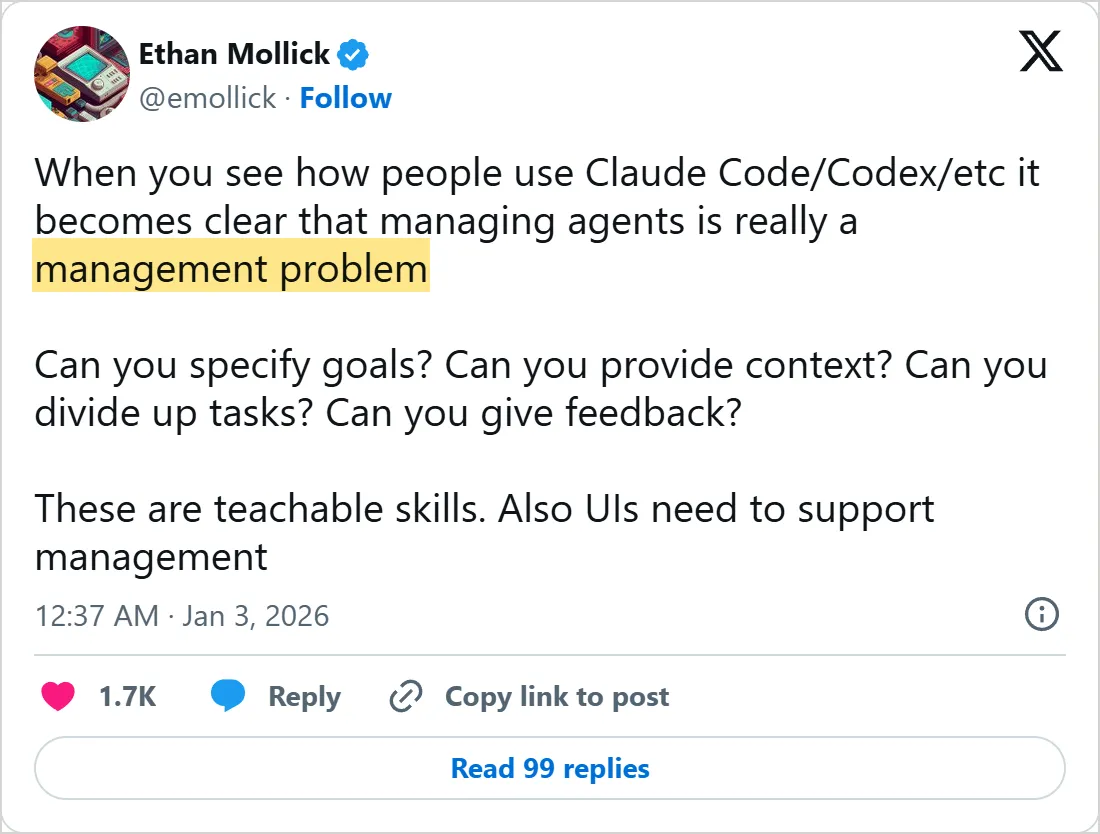
A screenshot of X's own embed of the post, taken on 5 November 2026, with the time in UTC. Select it to open the post on X.
Common mistakes
- Reaching for an agent when a fixed workflow would do. Anthropic notes that optimizing a single call with retrieval and examples is often enough.
- Starting with several agents. OpenAI says to maximize one agent's capabilities first, because more agents add complexity and overhead.
- Giving an agent many overlapping tools. OpenAI says the problem is not only the count, since some setups handle more than 15 distinct tools while others struggle with fewer than 10 overlapping ones.
- Skimping on tool descriptions. Anthropic says tool definitions deserve as much prompt engineering effort as the main prompts.
Try it yourself
- Pick a job you do by hand and write down its steps. Mark each one as something a fixed rule could handle or something that needs judgment.
- Run the three questions on an AI product you use, and decide whether it is a chatbot, a workflow or an agent.
- If you use Claude Code, ask it a question about your project and watch which tools it calls. Name the phase of each step.
Where to go next
That ends this course. Next is which AI tool to use. Its first lesson, how to choose an AI image generator, compares the apps that make pictures and says how to pick one for a job. The course then does the same for video, voice, music, research and AI agents.
The Learn hub lists every course. Mindket also lists ready-made agents, so you can see one before you build your own.
Check yourself
Who picks the next step in an agent, and who picks it in a workflow?
Show answer
B. The model in an agent, your code in a workflow Anthropic defines workflows as orchestrated through predefined code paths, and agents as systems where the model directs its own process and tool use.
Which action should an agent hand to a person first?
Show answer
C. Canceling orders or making payments OpenAI names high-risk actions, such as canceling orders or making payments, as one of two triggers for handing control to a person.
Your agent loops on tool calls. What does the lesson say to set so it cannot run forever?
Show answer
A. A stop condition, such as a maximum number of iterations Anthropic suggests a maximum number of iterations, and OpenAI lists exits such as a final-output tool, an error or a maximum number of turns.
A job is simple and its steps never change. What does the lesson advise?
Show answer
D. Start with the simplest solution, such as a fixed workflow Anthropic says to find the simplest solution possible, because an agent's autonomy means higher costs and the potential for compounding errors.
Frequently asked questions
What is the difference between an AI agent and a chatbot?
A chatbot answers what you ask, and an agent decides and acts toward a goal. A chat product that has tools can sit in between, so check whether it picks its own next step.
Is an AI agent the same as an automation workflow?
No. In a workflow your code sets the order of the steps, and in an agent the model does. Workflow tools can still contain an agent as one of their steps.
Can I build an AI agent without coding?
Yes. In n8n an agent is one node with a chat model and tools plugged in underneath, as our post on what n8n is explains.
Do agents remember anything between runs?
Only if you give them a way. Claude Code's docs say each new session starts with a fresh context window, and that learnings can carry over through auto memory and a CLAUDE.md file.
What is a multi-agent system?
Several agents sharing one workflow. OpenAI's agents guide mentions handoffs between agents, and its practical guide describes a manager agent that calls specialist agents as tools and a decentralized pattern where agents hand tasks to one another.
Which workflow patterns does Anthropic describe?
Prompt chaining, routing, parallelization, orchestrator-workers and evaluator-optimizer. In Anthropic's terms they are workflows, where code sets the paths, and a full agent is something you add only when they fall short.
Sources
- Anthropic Engineering: Building effective agents https://www.anthropic.com/engineering/building-effective-agents
- OpenAI: A practical guide to building agents https://cdn.openai.com/business-guides-and-resources/a-practical-guide-to-building-agents.pdf
- OpenAI: Agents guide https://developers.openai.com/api/docs/guides/agents
- Claude Code docs: How Claude Code works https://code.claude.com/docs/en/how-claude-code-works
- Ethan Mollick on X, 3 January 2026 https://x.com/emollick/status/2007249835465072857
- YouTube: Anthropic, Tips for building AI agents https://www.youtube.com/watch?v=LP5OCa20Zpg