
Seven research tools compared: free plans, prices and limits
Every big AI assistant now has a deep research mode. It plans its own searches, reads many pages and hands back a report with links to its sources. Two tools in the table are not assistants: Gemini Notebook answers from documents you upload, and Elicit searches scientific papers.
Two of them charge first. Claude and Microsoft need a paid plan before a single report. Gemini, Perplexity, ChatGPT and Elicit let you try first, so a month on free plans costs you nothing but the limits. The figures are as listed on 6 November 2026, from each vendor's own plan and help pages.
| Tool | Made for | Free plan | Entry paid plan, as listed | Limits that bite | Reads your own files | API |
|---|---|---|---|---|---|---|
| ChatGPT deep research | Long reports from the web, inside ChatGPT | Limited deep research | Go $8/month (limited deep research). Plus $20/month (expanded) | The plan page says Limited, Expanded or Maximum, with no counts | Apps for deep research: limited on Free and Go, included on Plus and Pro | The old deep research model shut down on 23 July 2026. The docs now point to longer web research |
| Gemini Deep Research | Reports from Google Search, with a plan you can edit first | Yes, for signed-in users 18 and over, with daily limits | Google AI Plus $4.99/month. AI Pro $19.99/month, with higher limits and the Pro model | Daily limits with no counts published. A report usually takes 5 to 10 minutes | Uploaded files, Gemini Notebook notebooks, and Gmail and Drive once Workspace is connected | Yes, a Deep Research agent in the Gemini API, in preview |
| Claude Research | Research across the web and connected work apps | No, paid plans only | Pro $20/month billed monthly, $17/month billed yearly | Uses your plan limits faster than a chat. Started on mobile, it skips your connectors | Connectors such as Google Workspace, used without asking each time | Not stated on its page |
| Perplexity Research | Quick cited reports from the web | 3 Pro Searches a day and 1 Research a month | Pro $20/month or $200/year | Most runs finish in under 3 minutes. Pro limits are monthly, for average use | File uploads, basic on the free plan | Yes, the Agent API runs multi-step research |
| Gemini Notebook (formerly NotebookLM) | Answers from sources you add, with citations | Yes, standard limits and up to 50 sources a notebook | Google AI Plus $4.99/month (twice the limits). AI Pro $19.99/month (four times) | Limits refresh every 5 hours until a weekly cap. A source holds up to 500,000 words | What you add (PDFs, Docs, web links, YouTube videos, audio), plus connected apps you turn on, on the web | Not stated on its page |
| Microsoft Researcher | Research across the web and your Microsoft 365 work | No | Microsoft 365 Premium $19.99/month or $199.99/year. At work, the Microsoft 365 Copilot add-on at $30/user/month, paid yearly | Slower than standard Copilot by design. Claude models need an administrator to allow them | Files, emails, meetings and chats you can already open | Not stated on its page |
| Elicit | Finding and summarizing scientific papers | Unlimited search across more than 138 million papers. Limited Research Reports | Industry: Pro $49 per user/month billed yearly ($588), or $75 billed monthly. Academic: Plus $11 per user/month billed yearly ($132), or $19 billed monthly | Free reports are limited. Pro reports draw on up to 135 data sources | Pro extracts data from papers you upload | Yes, an API and MCP server since July 2026 |
Which tool for which question
Start from where the answer lives. The open web, your own documents and published research each have a tool built for them, and the wrong one spends a month of limits on pages you did not need.
Wording the question and checking the sources work the same way in all of them. The research with AI lesson shows the five steps and the four-move check in Claude, Gemini and Microsoft Copilot.
| If you need | Start with | Because its page says |
|---|---|---|
| A free report to start | Gemini Deep Research | Signed-in adults can run it at no cost, with daily limits |
| An answer in a few minutes | Perplexity Research | It completes most research tasks in under 3 minutes |
| To steer the search before it runs | Gemini Deep Research | You can edit its research plan, then select Start research |
| Answers from your own documents | Gemini Notebook | It answers from the sources you add, up to 50 a notebook on the free plan |
| Scientific papers with exact citations | Elicit | It backs every claim with sentence-level citations from the papers |
| Your work email, files and meetings | Microsoft Researcher or Claude Research | Researcher reads what you can already open at work. Claude Research uses connectors such as Google Workspace |
| Work chats kept out of model training | Claude on a Team plan | No model training on your content by default |
| Research inside your own app | Gemini API, Perplexity Agent API or Elicit API | Each one runs research through an API |
Run a free deep research report in Gemini in three steps
Gemini is the free place to start. Deep Research needs only a Google account and an age of 18 or over. The menu names are the ones on Google's help page.
- Open Deep Research. Go to gemini.google.com and sign in. Click Add Files in the text box, then choose Deep Research.
- Pick the sources and ask. Click Sources to choose what it reads. Google Search is on by default, and Gmail and Drive appear once Google Workspace is connected. Type the question, what the answer is for and the dates you care about, then click Submit.
- Check the plan, then run it. Gemini shows its research plan first. Click Edit plan to change a step, then Start research. A report usually takes 5 to 10 minutes. Click Open when it is ready, and keep it with Share & export, then Export to Docs.
What heavier research costs a month
Once a free limit gets in the way, the plans that raise it cost close to the same. Five of the six bars sit within a cent of each other, so price will not separate ChatGPT, Gemini, Claude, Perplexity and Microsoft. What each one can read will.
Elicit costs more, and its Pro plan can be billed monthly or yearly, with lower prices for academics. That buys a paper index, a systematic review workflow that screens 5,000 papers and reports from up to 135 data sources, not a general assistant. A student with one literature review a term may get further on the free Basic plan.
Sources: OpenAI: ChatGPT and Codex pricing (read November 6, 2026), Google: Google AI plans (read November 6, 2026), Anthropic: Claude plans and pricing (read November 6, 2026), Perplexity: Perplexity Pro (read November 6, 2026), Microsoft: Compare all Microsoft 365 plans (read November 6, 2026), Elicit: Pricing (read November 6, 2026)
What Perplexity promised free users in 2025, and what its plan page lists now
Free research limits move, and a launch post is the worst place to read them. Perplexity announced Deep Research on X on 14 February 2025, open to everyone for free, with up to 5 queries a day without a subscription and 500 a day on Pro.
Its plan page now lists 1 Research a month on the free plan, and Pro's limit is monthly, for average use, with no number. Five a day was about 150 a month. Now it is one. The mode itself is now called Research, picked from the mode selector in the search box.
Before you build a weekly habit on a free plan, open the plan page and find this month's number. If you would rather watch a report being made before you try one, Google's own demo on YouTube runs Deep Research in the Gemini app.
up to 5 queries per day for non-subscribers and 500 queries per day for Pro users
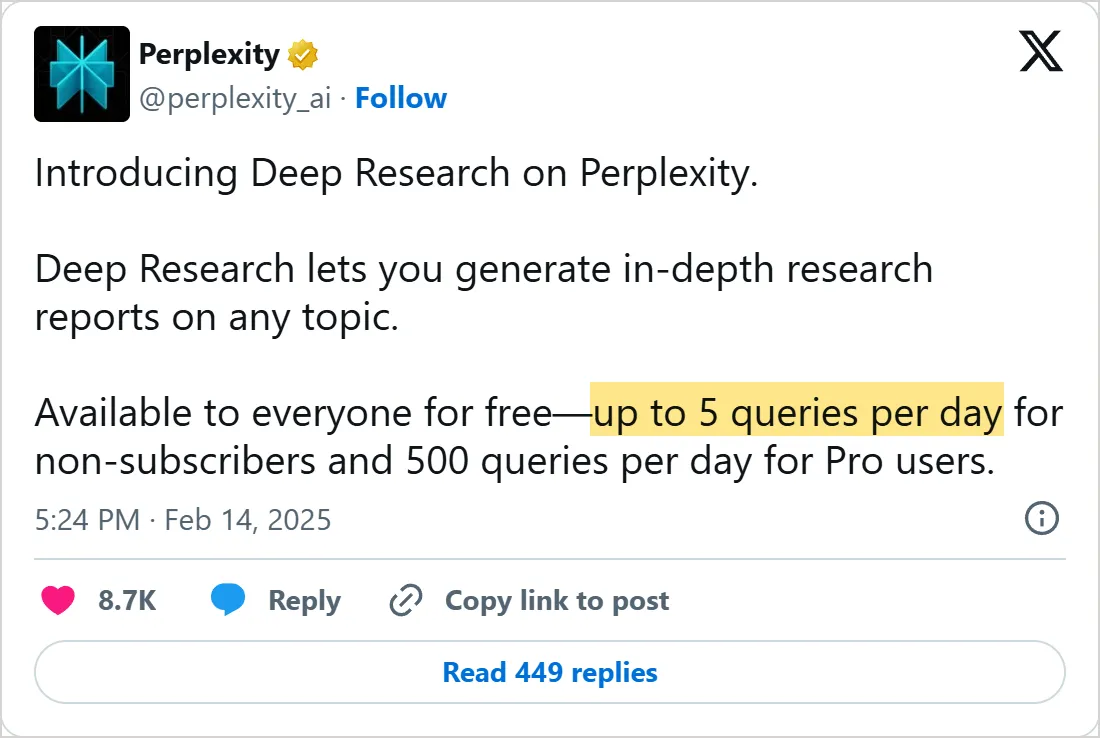

A screenshot of X's own embed of the post, taken on 5 November 2026, with the time in UTC. Select it to open the post on X.
Common mistakes
- Running a web report on a question your own files answer. Gemini Notebook cites the sources you add. Turn off connected apps in that notebook so it does not reach into other apps.
- Asking a general assistant for a literature review. A web report draws on whatever pages it finds, while Elicit quotes the sentence in the paper.
- Leaving work connectors on for an open-web question. Claude Research uses them without asking each time.
- Starting Claude Research on your phone when the answer sits in your Google Drive. On mobile it searches only the web and gives no warning.
- Paying for two assistants that do the same job. Their research plans cost about the same, so keep the one that reads the sources you need.
Learn the tool you picked
This course helps you choose, and the deeper lessons teach each tool. The Gemini Notebook tutorial covers sources, cited answers and Audio Overviews. To give a research tool data from your other apps, connect MCP servers shows how an AI app links to them.
Check yourself
You want answers drawn only from three PDFs your team wrote. Which tool fits?
Show answer
B. Gemini Notebook Gemini Notebook answers from the sources you add, with citations to them, so it fits when the answer lives in those PDFs.
Which tool in this lesson needs a paid plan before you can run a single report?
Show answer
C. Claude Research Claude's help page lists Research for paid plans only, while Gemini and Perplexity have free limits.
Perplexity launched Deep Research with 5 free queries a day. Where do you check today's free limit?
Show answer
D. Perplexity's own plan page The plan page now lists 1 Research a month on the free plan, far from the launch number.
You need scientific studies with the exact sentence behind each claim. Which tool fits?
Show answer
A. Elicit Elicit backs each claim with sentence-level citations from the papers it searches.
Frequently asked questions
Which free AI research tool should I try first?
The one whose free allowance matches how often you research. Gemini's Deep Research allowance renews every day, Perplexity gives one Research run a month, and Elicit lets you search papers as often as you like before paying.
How much does an AI research tool cost?
The general assistants charge almost the same for their research plans, and Claude's Pro costs less if you pay for a year up front. Elicit's Pro is the exception: it costs more, it can be billed monthly or yearly, and academics pay less than industry users. Prices move, so read the plan page on the day you buy.
Can I use AI research tools at work with company files?
Yes, on a plan your company manages. Microsoft says Researcher follows the permissions and compliance policies already in place, and Claude's Team plan does not train models on your content by default. Ask IT before you connect a work drive to a personal account.
Is Perplexity better than ChatGPT for research?
For speed, Perplexity says its Research mode finishes most tasks in under 3 minutes. ChatGPT's deep research sits inside the assistant you may already pay for, with apps on Plus. No vendor publishes a shared test, so run one question in both and compare the sources.
Which AI is best for academic research?
For finding and reading papers, a tool built on a paper index. Elicit backs claims with sentence-level citations, and it can find up to 1,000 relevant papers for one question.
Sources
- OpenAI: ChatGPT and Codex pricing https://learn.chatgpt.com/docs/pricing
- OpenAI: ChatGPT plans and pricing https://chatgpt.com/pricing
- OpenAI: o3-deep-research model https://developers.openai.com/api/docs/models/o3-deep-research
- Google: Use Deep Research in Gemini Apps https://support.google.com/gemini/answer/15719111?hl=en
- Google: Google AI plans https://gemini.google/us/subscriptions/?hl=en
- Google: Deep Research agent in the Gemini API https://aistudio.google.com/docs/deep-research
- Google: Add sources in Gemini Notebook https://support.google.com/gemininotebook/answer/16215270?hl=en
- Google: Gemini Notebook usage limits https://support.google.com/gemininotebook/answer/17670842?hl=en
- Google: Use and manage connected apps in Gemini Notebook https://support.google.com/gemininotebook/answer/18784282?hl=en
- Anthropic: Using Research on Claude https://support.claude.com/en/articles/11088861-using-research-on-claude
- Anthropic: Claude plans and pricing https://claude.com/pricing
- Perplexity: What is Research mode? https://www.perplexity.ai/help-center/en/articles/10738684-what-is-research-mode
- Perplexity: Which subscription plan is right for you? https://www.perplexity.ai/help-center/en/articles/11187416-which-perplexity-subscription-plan-is-right-for-you
- Perplexity: Perplexity Pro https://www.perplexity.ai/hub
- Perplexity: Migrate from Sonar to the Agent API https://docs.perplexity.ai/docs/agent-api/migrate-from-sonar/how-to
- Microsoft: Get started with Researcher in Microsoft 365 Copilot https://support.microsoft.com/en-us/topic/get-started-with-researcher-in-microsoft-365-copilot-e63ab760-f3de-4c47-ae87-dad601b0e9c4
- Microsoft: Compare all Microsoft 365 plans https://www.microsoft.com/en-us/microsoft-365/buy/compare-all-microsoft-365-products
- Microsoft: Copilot Studio pricing https://www.microsoft.com/en-us/microsoft-365-copilot/pricing/copilot-studio
- Elicit: Pricing https://elicit.com/pricing
- Elicit: AI for scientific research https://elicit.com/
- Perplexity (@perplexity_ai) on X: Deep Research launch https://x.com/perplexity_ai/status/1890452005472055673
- Google on YouTube: Gemini Deep Research Demo https://www.youtube.com/watch?v=buwMJxvW7wI