
Before you start
You need a free Hugging Face account, Python 3.10 or later and a terminal. Lesson 2 asks for Python 3.11, the oldest version Transformers is tested on, so a 3.11 environment carries you through the whole course. The account is what opens gated models, access tokens and higher download limits. Everything on the Hub lives in a repository, a version-controlled folder with commits and branches, much like a GitHub repo. The huggingface_hub library reads and writes those repositories from Python. It also ships hf, a CLI (command line interface, a program you drive by typing commands). If you only want the CLI, the installation page also offers a standalone installer for macOS, Linux and Windows.
Old tutorials still say huggingface-cli login. Hugging Face renamed the tool to hf in July 2025, and the v1.0 migration guide lists the old name as removed. Commands now read as a resource, then an action: hf auth login, hf cache ls. Downloads and uploads stay at the top level as hf download and hf upload. Old guides may also set HF_HUB_ENABLE_HF_TRANSFER for faster downloads. The same release ignores it, because speed now comes from the hf_xet package, installed with huggingface_hub since version 0.32.0.
A model repository usually holds three kinds of file. A config.json describes the model's shape. Tokenizer files describe the tokenizer, which cuts text into numbered pieces called tokens, the units a model reads. Weight files hold the weights, the learned numbers the model computes with, and they make up nearly all of the download.
On Windows, the download cache relies on symlinks, file entries that point at another file. Turn on developer mode in Windows settings, or run Python as admin. Without either, the cache still works, in what the installation page calls a non-optimized manner.
Step by step, with screenshots
These six steps need no account. They go from the models list to a gated model, with one screenshot of the site for each.
Open huggingface.co/models. Under Tasks, click Text Generation, then open Sort and choose Most downloads. The list now holds only text generation models, the most downloaded first.

Type
gpt2into the search box at the top. A menu of matching models drops down withopenai-community/gpt2first. Click it.
The page that opens is the model card. The tags under the name show its task, the libraries that load it and its license. Find the License badge before you build on any model. This one says
mit.
Click Files and versions (just Files in a narrow window), next to Model card. This is the repository itself.
config.jsonis 665 bytes of settings, andmodel.safetensorsholds the weights at 548 MB. Most of the rest is the same model saved again for other tools.
Go back to Model card and click Use this model. The menu offers Transformers under Libraries, notebooks on Google Colab and Kaggle, and local apps such as vLLM.

Some models ask for your agreement first. Open google/gemma-2-2b while signed out. A box says you must accept the conditions to reach the files, with Log in and Sign Up buttons at its foot.

Screenshots of huggingface.co, taken on 6 November 2026.
Find a model and read its card
Start on the models page with a task filter, such as text generation or text classification. The Hub lists more than 2M models, 1.5M datasets and 1.5M Spaces, its name for hosted demo apps. A task, then a license, cuts that list down before you read a single page. Lesson 2 hands that same task name to pipeline().
Each model page renders the repository's README.md as its model card: Markdown text under a block of YAML, plain text written as key: value lines. The license badge, the task tag and the filters you just used all come from that block. When two models look alike, compare the blocks first. On a model you own, the Edit model card button changes the same block through a form.
The license list mixes software licenses such as apache-2.0 and mit with model licenses such as llama3.1 and gemma, and with non-commercial ones like cc-by-nc-4.0. A card can also say license: other and point to custom terms. The badge names the license. It can't tell you whether your use fits, so read the terms before a model goes into anything you sell.
Two more filters come from the card: training dataset and base model. A base model is the one another model was built from. Builders fine-tune it, which means training it further on new data, or quantize it, storing its numbers with fewer bits so it needs less memory. Filtering on a base model lists every variant made from it. That is how you find a smaller copy of a model you already like.
You can read the metadata without a browser. The library's install check prints a model's tags and its task. In the docs' example run on gpt2, the tags include license:mit and the task is text-generation.
python -c "from huggingface_hub import model_info; print(model_info('gpt2'))"| Card key | What it holds | What it changes for you |
|---|---|---|
license | The license id, shown as a badge and used by the license filter | other means custom terms, named in license_name and linked in license_link |
pipeline_tag | The task, such as text-generation | Decides the widget on the page and which inference APIs serve the model |
library_name | The library that loads it, such as transformers | Repos created after August 2024 must set it, since a config.json alone no longer implies Transformers |
base_model | One or more parent models, by Hub id | Puts the model under its parent when you filter by base model |
datasets | The training datasets, by Hub id | Adds a "Datasets used to train" line with links |
new_version | A newer model that replaces this one | The page links to the latest version |
Sign in and download with the hf CLI
An access token is a key that lets a script act as your account. Public models download without one, but gated models refuse a request that lacks it. Signed-out requests also get the lowest rate limits, the number of requests the Hub accepts in each 5-minute window, counted per IP address. Past the limit, the Hub answers with error 429, the web's code for too many requests. Since version 1.2.0, the library retries those errors on its own.
Preview before you pull anything big. The docs ran --dry-run on the GPT-2 repository: it held 26 files, and 11 of them, 5.6G in all, were still to fetch. Most of that is one model saved again for other runtimes, as pytorch_model.bin, tf_model.h5, flax_model.msgpack, ONNX and TFLite files. Transformers loads safetensors files first, a weight format that loads without running any code, so the other copies are disk you never use.
Python has the same two moves. hf_hub_download fetches one file, and snapshot_download fetches a whole repository or only the files that match your patterns. Both return a path into the cache. With --local-dir you get real files in the folder you name instead, plus a small .cache/huggingface/ folder that tracks what came from where. To freeze a download at one version, give a tag, branch or commit hash with --revision on the command line, or revision= in Python. A later push by the authors then leaves your files alone.
26
files in the GPT-2 repository, in the docs' dry run
Source: Hugging Face: Download files from the Hub (read November 5, 2026)
5.6G
still to download in that run, across 11 files
Source: Hugging Face: Download files from the Hub (read November 5, 2026)
548.1M
the model.safetensors weights on their own
Source: Hugging Face: Download files from the Hub (read November 5, 2026)
pip install -U "huggingface_hub"
hf auth login
hf auth whoami
hf download openai-community/gpt2 --dry-run
hf download gpt2 config.json model.safetensors- Create a virtual environment and install the library with
pip install -U "huggingface_hub". The CLI ships inside it. - Make a token. In your Hugging Face settings, open the Access Tokens tab, click New token, then pick a role and a name. A read token covers downloads.
- Run
hf auth login. By default it signs you in through the browser, printing a URL and a short code. On a server, keep the token inHF_TOKENand runhf auth login --token $HF_TOKEN, so the raw value never lands in your shell history. - Check the sign-in with
hf auth whoami. It prints your username and your organizations. - Preview with
hf download openai-community/gpt2 --dry-run. Nothing is written. Each file shows the bytes it would add. - Fetch only the files you load:
hf download gpt2 config.json model.safetensors, as the download guide writes it. It prints the local path on its last line. The short id works because the Hub redirectsgpt2toopenai-community/gpt2. - Read that path. Without
--local-dir, files go to the cache under~/.cache/huggingface/hub, orC:\Users\username\.cache\huggingface\hubon Windows. SetHF_HOMEto move the cache to a bigger disk.
| Account | Hub API calls | File downloads | Web pages |
|---|---|---|---|
| Signed out, per IP address | 500 | 3,000 | 100 |
| Free account | 1,000 | 5,000 | 200 |
| PRO account | 2,500 | 12,000 | 400 |
Gated models and token roles
A gated model is one whose authors want a request before the files open. Gemma 2, the text generation example in lesson 2, is one: its page asks you to review and agree to Google's usage license first.
Requests happen in the browser, signed in. Clicking Agree shares your Hugging Face username and email with the authors, if they chose to collect them, plus anything you typed into their form. With automatic approval the files open at once. With manual approval you wait for the authors, and they can block your access later without notice.
Scripts need the token from the sign-in step, because a browser session does not carry over to Python. In code, login() from huggingface_hub stores a token the way the CLI does, and the download functions take a token argument too. On a server, setting HF_TOKEN is enough, since every call picks it up.
Each token has a role, the set of things it may do. Pick the role by what the script does. Make one token per machine or app, so revoking one leaves the rest working. A leaked token gets deleted or refreshed from the same Access Tokens tab.
Sharing needs a write token. To publish a model folder of your own, the getting-started page uses a single command, hf upload your-username/your-model-name ./my-model-directory, and the CLI deals with large files by itself. For a small change, a repository's web page has Files, then Add file.
| Role | What it can do | Use it for |
|---|---|---|
| Read | Read every repository you can read, public or private | Downloads and inference calls |
| Write | Everything read does, plus push to repositories you can write to | Uploading a model or editing a model card |
| Fine-grained | Only the resources and actions you tick when you make it | Production apps, such as read access to one gated model |
How huggingface_hub's maintainers handle rate limits and the cache
Rate limits are what most download scripts hit first. Célina Hanouti, an engineer at Hugging Face and co-maintainer of huggingface_hub, announced version 1.2 on X on 5 December 2025, with smarter handling of rate limits for steadier uploads, downloads and API calls. When a script still stops on one, run pip show huggingface_hub and check the version before you write retry code of your own.
The cache changed in September 2026. Lucain Pouget, who maintains the library, posted on X on 17 September that version 1.32.0 shares downloaded files between repositories. His example: fetching Qwen-Image, then Qwen-Image-Edit, reused 16.8 GB of weights. Hashes are checked when a file is uploaded, which is why one copy can serve both models. His upgrade line is hf update.
Shared files are one more reason to clean up with the CLI and not by hand. The CLI guide says hf cache prune also removes shared files that no repository points to any more.
Xet verifies file hashes on upload, making cross-repo caching safe.
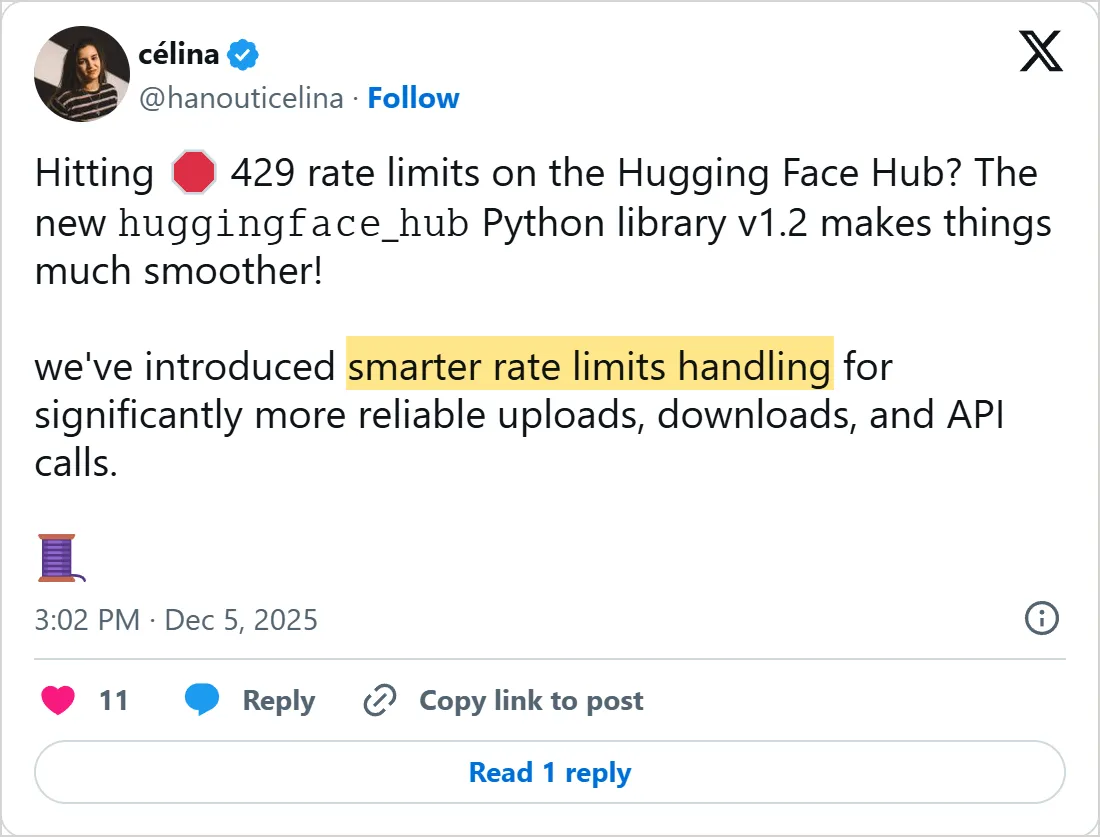
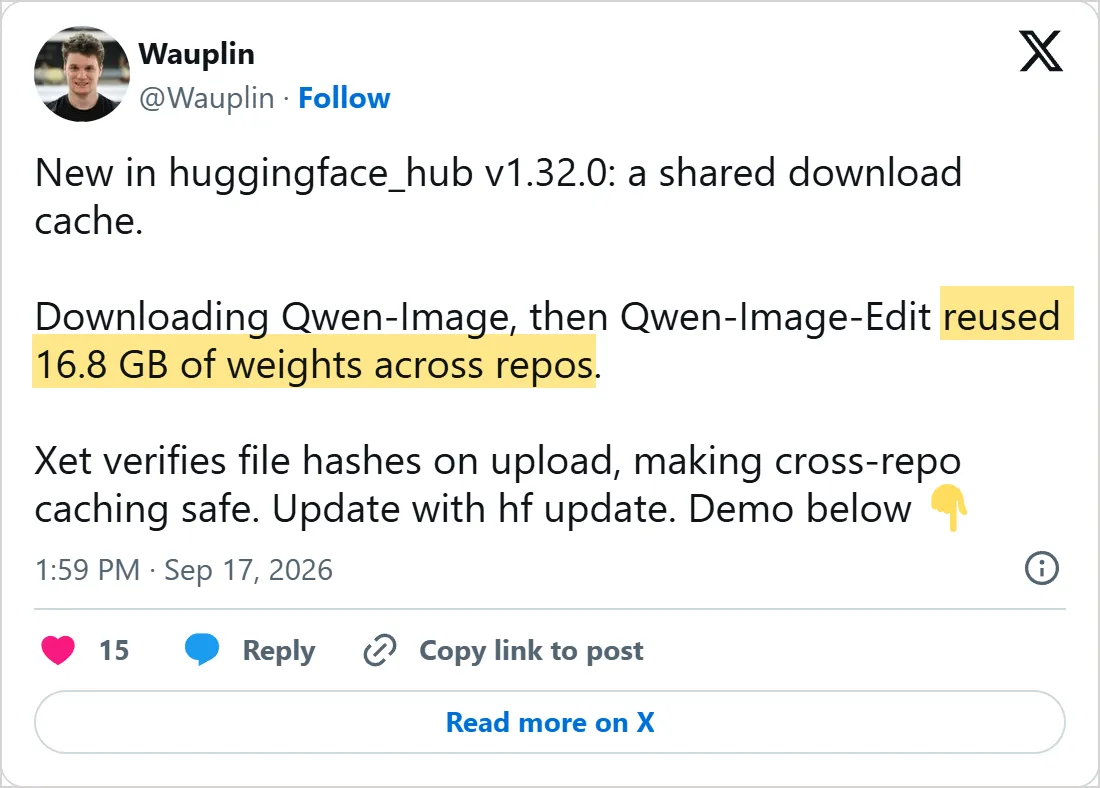
Screenshots of X's own embeds of the posts, taken on 5 November 2026, with the time in UTC. Select one to open the post on X.
Common mistakes
- Copying
huggingface-clicommands from an older tutorial. Version 1.0 removed that name, so translate each one:huggingface-cli loginbecomeshf auth login. - Downloading a whole repository by habit. A repo can carry the same weights in five or six formats, and your code reads one of them.
- Building a product on a gated model with no plan B. The authors decide on approval and can take it back, so note an open alternative while you choose.
- Loading
.binweights when a safetensors copy sits next to them. Those files use pickle, a Python format the Transformers docs call insecure. - Fetching a dataset with a plain
hf download. The command looks for a model unless you add--repo-type dataset, or--repo-type spacefor a demo app. - Pasting a raw token into a command. It stays in your shell history, which is why the CLI docs pass it through an environment variable.
- Running download scripts signed out. The rate-limit docs name a missing
HF_TOKENas the most common reason people hit a 429 error. - Editing a file through the path a download returns. That path points into the cache, and changing the file corrupts it. Copy it out, or download with
--local-dir. - Expecting
hf auth logoutto sign a server out. WhileHF_TOKENis set, the CLI keeps using it until you unset the variable.
Try it yourself
These two lines are the download guide's filter example, and they need no token, since GPT-2 is public. The first pattern keeps every JSON and Markdown file. The second one skips the tokenizer's vocabulary file anyway, so you see both filters at work on one repository.
from huggingface_hub import snapshot_download
snapshot_download(repo_id="gpt2", allow_patterns=["*.md", "*.json"], ignore_patterns="vocab.json")- Paste the lines into a Python shell, which shows the path the call returns, and list that folder. Which files from the dry run are missing, and which pattern kept each one out?
- Set
HF_HUB_OFFLINE=1in your shell and run the snippet again. Does it still hand back a path with the network cut off? - Run
hf download openai-community/gpt2 --include "*.json" --dry-runand count the JSON files in the repository. - On the models page, find a model whose card says
license: otherand open its license link. Could a paid app use it? - Run
hf cache lsand find GPT-2 in the list. Then remove it withhf cache rm model/gpt2, the CLI guide's own example, and list the cache again. What is left?
Next
Files on disk do nothing yet. Lesson 2 loads a model with one pipeline() call and covers the device and memory settings that decide whether it runs. Its text generation example uses the gated Gemma 2, so request access now and the approval may be waiting when you get there. Models too big for your machine come in lesson 3, where hosted providers run them for you. Before you pick something large, the local LLM hardware lesson shows how much memory each model size asks of your machine.
Check yourself
Which command signs you in with the current Hugging Face CLI?
Show answer
C. hf auth login The tool was renamed to hf, sign-in moved under hf auth, and version 1.0 removed the huggingface-cli name.
What does adding --dry-run to hf download do?
Show answer
A. Lists each file and the bytes left to fetch, and writes nothing A dry run shows what a download would add, so you can drop formats you will never load.
A model card says license: other. What do you do before using the model?
Show answer
D. Read the terms named in license_name and linked in license_link The value other marks custom terms, and only those terms say whether your use is allowed.
Where does hf download put files when you leave out --local-dir?
Show answer
B. In the cache, under ~/.cache/huggingface/hub by default Downloads go to the cache unless you pass --local-dir, and HF_HOME moves that cache.
Frequently asked questions
Is Hugging Face free?
Yes for the basics: an account, browsing and downloading public models cost nothing. A PRO plan raises your rate limits and adds monthly credits for hosted models. Free accounts get no monthly credits but can buy some, and lesson 4 shows where hosting a demo needs a paid plan.
How do I delete downloaded models to free disk space?
Use the cache commands. hf cache ls lists what is stored, hf cache rm deletes the repos or revisions you name, and hf cache prune removes revisions nothing points to any more. Both delete commands take --dry-run to preview.
Can my whole team use a gated model I have access to?
No. Access is granted to individual users, so each teammate sends a request. For a production app, the token docs suggest that a member with access creates a fine-grained token that reads that one model.
Can I download a model with git clone instead?
Yes, since each model is a git repository, but large files need the Git Xet extension (git xet install). The hf tools handle large files with no extra setup and let you pick single files, which a clone cannot.
Sources
- Hugging Face Hub documentation https://huggingface.co/docs/hub/index
- Hugging Face Hub: Model cards https://huggingface.co/docs/hub/model-cards
- Hugging Face Hub: Licenses https://huggingface.co/docs/hub/repositories-licenses
- Hugging Face Hub: Gated models https://huggingface.co/docs/hub/models-gated
- Hugging Face Hub: User access tokens https://huggingface.co/docs/hub/security-tokens
- Hugging Face Hub: Rate limits https://huggingface.co/docs/hub/rate-limits
- Hugging Face Hub: Getting started with repositories https://huggingface.co/docs/hub/repositories-getting-started
- huggingface_hub: Installation https://huggingface.co/docs/huggingface_hub/installation
- huggingface_hub: Command Line Interface (CLI) https://huggingface.co/docs/huggingface_hub/guides/cli
- Hugging Face: Download files from the Hub https://huggingface.co/docs/huggingface_hub/guides/download
- huggingface_hub: Migrating to v1.0 https://huggingface.co/docs/huggingface_hub/concepts/migration
- Hugging Face blog: Say hello to hf https://huggingface.co/blog/hf-cli
- Transformers: Installation https://huggingface.co/docs/transformers/installation
- Transformers: Loading models https://huggingface.co/docs/transformers/models
- Inference Providers: Pricing and billing https://huggingface.co/docs/inference-providers/pricing
- Hugging Face: google/gemma-2-2b model page https://huggingface.co/google/gemma-2-2b
- Célina Hanouti on X: huggingface_hub v1.2 and 429 rate limits https://x.com/hanouticelina/status/1996958360323735611
- Lucain Pouget on X: a shared download cache in huggingface_hub v1.32.0 https://x.com/Wauplin/status/2100585417875603856