
Before you start
You need one image app, and a free account is enough to begin. ChatGPT Images works on every ChatGPT plan, on the web, iOS and Android. The Gemini app makes pictures with Nano Banana 2 at no charge, and Midjourney is a third option with its own prompt rules. Everything here works in all three, with one difference about length that Midjourney's own pages spell out.
In ChatGPT, ask for an image in any conversation, or select More and then Images, where Templates offers starting points such as a poster or a logo. A picture can take a few minutes there, and you can keep chatting while it is made. In Gemini, pick Create images from the tools menu, or open the sidebar and click Images.
ChatGPT saves every picture you make under Images, so you can reopen and reuse it later. Gemini lets you download at 2K with a Google AI plan and at 1K without one, which is enough for a slide or a social post.
A prompt is the text you type to describe the picture you want. An image model is the AI that turns that text into pixels. Each app runs its own model, so one prompt gives different pictures in different apps. The models also change every few months. With a Google AI plan, Gemini's overview now lists Nano Banana 2.1, which Google calls its best image generation and editing model.
Pick one picture you need this week, not a test subject. A poster for an event, a photo for a product listing or an illustration for a slide all work. A real job gives you a way to judge the result: either it would do the job or it would not.
Nano Banana
Google releases Gemini 2.5 Flash Image, its native image generation model, in preview.
Source: Google AI Studio changelog (read November 5, 2026)
Nano Banana Pro
Gemini 3 Pro Image arrives in preview as the next version of Nano Banana.
Source: Google AI Studio changelog (read November 5, 2026)
Nano Banana 2
Google launches a faster model built for speed and high volume.
Source: Google AI Studio changelog (read November 5, 2026)
ChatGPT Images 2.5
OpenAI announces sharper details, faster generation and more precise editing in ChatGPT.
Source: ChatGPT on X (read November 5, 2026)
Nano Banana 2.1
Google's newest image model becomes generally available to developers.
Source: Google AI Studio changelog (read November 5, 2026)
Write your first prompt in five parts
Each step adds one part. The sample is our own, built on the photorealistic template in Google's image generation docs. Swap in your subject.
Read it once before the steps. It starts with the subject and the job, moves to the place, and ends with light and camera, the way you might brief a photographer who has never seen your bakery.
A photorealistic close-up of a round sourdough loaf on a floured wooden table
in a small bakery kitchen, for the cover of a bakery's weekend menu.
Early morning window light from the left, soft shadows, warm colors.
Shot from a low angle with a 50mm lens. Square image.- Say what the picture is for. "The cover of a weekend menu" tells the model more than "a bread photo". Google makes the same point with a logo: asking for a logo for a high-end, minimalist skincare brand beats asking for a logo. The purpose also settles the shape and any empty space the layout needs.
- Name the subject and its action. Pick the precise word: "enormous" or "gigantic" says more than "big". Write numbers instead of plurals, "three cats" rather than "cats", or a group word such as "a flock of birds". A person needs a pose as well. Say how much of the body shows, where they look and what their hands do: "looking down at the open book" or "hands naturally gripping the handlebars".
- Put it somewhere. Indoors or outdoors, which room or street, what time of day. The setting also tells the model where the light comes from. A mug "on a polished concrete surface" or a cat "on a sunny windowsill" already reads as a scene.
- Choose the style or medium. Photorealistic, charcoal drawing, watercolor painting and cartoon illustration are the examples on the Gemini help page. When you want something that looks like a photograph, ask for "photorealistic" or "real photograph" in those words.
- Set the framing and the light. Name the shot (close-up, wide-angle, macro), the camera angle (low angle, eye level) and the light (soft window light, studio lights). Camera terms are hints about the look, not a promise of how a real lens would behave, so a "50mm lens" nudges the picture rather than fixing it. Add the shape here too: tall for a poster or a phone screen, wide for a slide.
The order is a habit, not a rule. Short prompts, paragraphs, lists and tags can all carry the same intent, by OpenAI's account, so use the layout you find easiest to read and change.
Words that change the look
Length is where the apps part ways. Google's best practices ask for detail: "The more detail you provide, the more control you have." Midjourney points the other way, as the quote shows, and adds that long lists and detailed instructions can confuse it. Fewer details there give more variety and less control.
So write the full description for ChatGPT and Gemini. For Midjourney, cut it to the subject, the medium and one or two style words, like its own example "Colored pencil illustration of bright orange California poppies".
Mood words on their own are weak. For a wide, rainy, low-light or neon scene, OpenAI's guide asks for scale, atmosphere and color instead of "moody" or "cinematic". Name the materials too: worn leather, wet asphalt, brushed steel.
Stuck for what to add? Midjourney's seven areas make a handy checklist: subject, medium, environment, lighting, color, mood and composition.
Google's docs also give fill-in templates for common jobs. Their shapes work in any app:
The table collects words the guides use as examples, with a short sample of each. Swap one row at a time and compare the pictures side by side.
Why Midjourney prompts stay short
Short and simple prompts typically generate the best images with Midjourney.
- Stickers and icons: the style, the subject and its accessories, then the visual details, such as bold, clean outlines, simple cel-shading and a white background.
- Product shots: a high-resolution, studio-lit product photograph on a named surface, with the lighting setup, the camera angle and the one detail that must be in sharp focus.
- Backgrounds for a title: one small subject in a corner of a vast, empty canvas, which leaves space for the words you add later.
- Comics: "Make a 3 panel comic" in a named style, with the same characters in every panel.
| What you control | Words from the guides | A sample in a prompt |
|---|---|---|
| Medium | photo, painting, illustration, sculpture, doodle | a charcoal drawing of a lighthouse |
| Shot and angle | wide-angle shot, macro shot, low-angle perspective, closeup, birds-eye view | a macro shot of dew on a spider web |
| Light | soft, ambient, overcast, neon, studio lights | overcast light over a quiet harbor |
| Color | vibrant, muted, monochromatic, pastel, black and white | a muted, pastel palette |
| Mood | playful, calm, gloomy, energetic | a calm, empty beach at dawn |
| Shape | square, wide, tall, an aspect ratio such as 16:9 | "Aspect ratio 16:9." as the last line |
Put words inside the picture
Letters are a known weak spot. OpenAI's image generation guide lists "precise text placement and clarity" among the limits of its own model, so plan to check every word. The poster prompt below is ours and follows the rules in the list.
Gemini has its own trick. When an image needs text, Google suggests generating the text first and then asking for an image that uses it. Draft the headline and the small print in the chat, settle them, and only then ask for the poster.
Language matters for lettering. Gemini's help page promises more accurate spelling in all supported languages, while Midjourney does best with the Latin alphabet. For a sign in Chinese or Japanese, start in Gemini.
Check the lettering at full size, not in the chat preview. When one word is wrong, a short follow-up can give the correct spelling and ask to keep everything else.
A poster for a neighborhood book swap, flat illustration style,
stacks of colorful books on a park bench under a tree.
At the top, the words "Book Swap Sunday" in a bold, rounded sans-serif.
At the bottom, smaller: "June 14, Elm Park, 10 am".
No other text. Tall portrait format.- Quote the exact words. In Midjourney, from version 6 on, words inside double quotation marks show up in the image. Single quotes and apostrophes do not work for this.
- Say where the words go and how they look. "Bold, rounded sans-serif at the top" is enough. Describe the font style in plain words.
- Ask for the words once, and nothing else. "Render the tagline exactly once" and "No extra text, no watermarks, no unrelated logos" come from OpenAI's own ad example.
- Spell a rare name letter by letter when it keeps coming out wrong.
- Keep it short. Midjourney does best with short words and phrases in the standard Latin alphabet, and suggests adding cues such as "with the words" or "written".
What the Gemini team and Max Woolf put in a Nano Banana prompt
The Gemini app's own account posted a prompt checklist on X on April 13, 2026. It has six labeled parts: subject, composition, action, location, style and, for a picture you already have, editing instructions. Composition means how the shot is framed. For edits, it asks you to be direct and specific, as in "Remove the car in the background". Its first five line up with this lesson's steps, and the one step it skips is the picture's purpose.
Max Woolf, formerly a senior data scientist at BuzzFeed, tested the first Nano Banana model in depth on his blog on November 13, 2025, with his notebooks on GitHub. Writing MUST in capitals made the model follow a rule more closely. A line asking for no text or watermarks removed stray lettering and kept the picture. Five edits in one request, opened with "Make ALL of the following edits to the image", all came out right in his test.
That last finding fits the one-change habit once you already know every change you want. While you are still exploring, one change at a time shows which word did what. Woolf tested an older model than today's Nano Banana 2, so try each trick in your own app first. The video below walks through Google's own image guide with examples.
Get the most out of your Nano Banana generations by establishing the story, subject, and style.
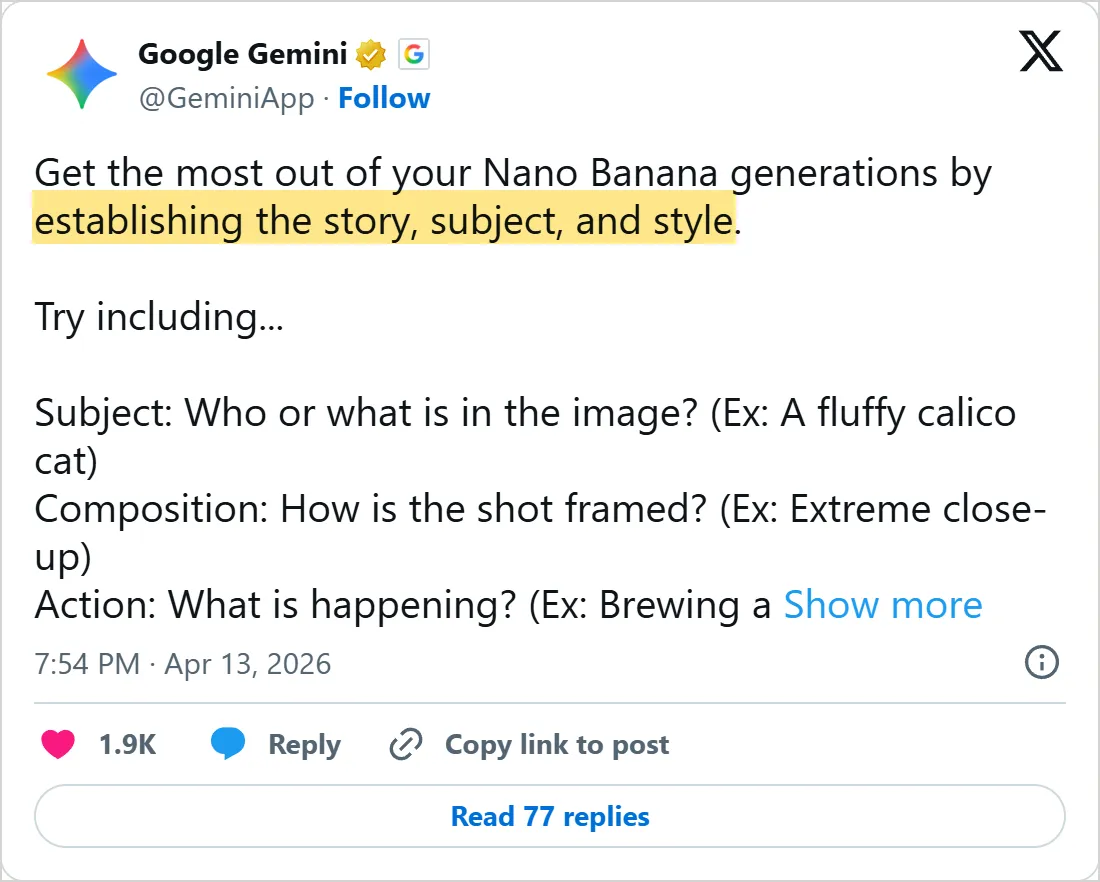

A screenshot of X's own embed of the post, taken on 5 November 2026, with the time in UTC. X cuts the post short with Show more. Select it to open the post on X.
Common mistakes
- Saying what you do not want. "A party with no cake" can still put a cake on the table. Google's version of the fix: write "an empty, deserted street with no signs of traffic" instead of "no cars".
- Changing five things in one follow-up. When the new picture is worse, you cannot tell which change did it. Ask for one, look, then ask for the next.
- Leaving the shape for later. A tall poster cropped out of a square picture loses its top and bottom, so set the aspect ratio in the first prompt or with ChatGPT's aspect ratio picker.
- Starting a new chat after every miss. A follow-up such as "keep everything the same, but make the lighting warmer" holds on to what already works.
- Trusting the spelling. Zoom in on every word, the small print included, before you post the picture.
- Counting on an exact number of pictures. Gemini will not always return as many images as you asked for, so check before you plan around four versions.
- Leaving the purpose out. Without "for a menu cover" or "for a slide background", the model has no reason to leave room for a title.
Try it yourself
Use the picture you chose at the start. Each exercise changes one thing, so you can see what that one thing does.
Keep a note of each prompt next to its picture. After five runs you have a small cheat sheet of words that work in your app, and a few that it ignores.
- Write the five-part prompt for your real picture and run it once.
- Change only the light, run it again and put the two results side by side.
- Add one line of quoted text and check each letter against what you typed.
- Paste the same prompt into a second app and note which parts it ignored.
- Ask for a version with empty space on one side for a title, and see whether the subject moves.
Before you call a picture done: its purpose is clear at a glance, every quoted word is spelled right, hands and faces hold up at full size, and there is room where the title goes.
Next: edit images with AI
A new picture from text is half the job. Often you already have the photo and want one thing changed: a sky, a sofa, a background. The next lesson, edit images with AI, does that with Nano Banana in Gemini and with ChatGPT, and the prompts there reuse what you practiced here. Video follows in lesson 3, and lesson 4 runs an image model on your own computer with ComfyUI.
The same habits of context, examples and small changes run through text prompts as well, and prompt engineering basics teaches them for chat replies instead of pictures.
Check yourself
You need a photo for a bakery menu cover. Which prompt gives the model the most to work with?
Show answer
C. A photorealistic close-up of a sourdough loaf on a floured table, morning window light, for a menu cover It names the purpose, the subject, the setting, the style and the light, the five parts the lesson builds.
How do you get the words "Book Swap Sunday" onto a Midjourney poster?
Show answer
A. Put them in double quotation marks From version 6 on, Midjourney renders words placed inside double quotation marks, and single quotes do not work.
You want a street with no cars in it. Which wording follows Google's advice?
Show answer
B. an empty, deserted street with no signs of traffic Google tells you to describe the scene you want instead of listing the things to leave out.
The new picture got worse after you changed the style, the light and the angle at once. What next?
Show answer
D. Go back and change only one of the three One change per request shows you which change made the difference.
Frequently asked questions
Can ChatGPT or Gemini write image prompts for me?
Yes, and Google's Flow help recommends it: send Gemini your prompt, an image or even a video and ask for new prompts. Ask for two or three versions that differ in one way only, such as the light. Delete any detail you never asked for before you run one.
Why does AI spell words wrong in images?
Small, exact lettering is still hard for image models. Two settings can help. OpenAI's prompting guide suggests comparing medium or high quality for small text or dense information. In the Gemini app, paid subscribers can choose Redo with Pro, which adds detail to images with text.
Do negative prompts work in ChatGPT and Gemini?
Yes, as plain words inside the prompt. Describe the scene you want first, then add short exclusions for things like extra text, logos or watermarks, as OpenAI's examples do. In Midjourney, exclusions have a parameter of their own, called no. ComfyUI, in lesson 4, gives the negative prompt a separate box.
Will a Midjourney prompt work in ChatGPT?
Often not, at least not as written. Midjourney adds settings called parameters to the end of a prompt, while ChatGPT and Gemini work from plain sentences. Rewrite it as plain sentences, or start from the formula on Google's overview: create an image of a subject, an action and a scene.
Sources
- Google: Nano Banana image generation (Gemini API docs) https://aistudio.google.com/docs/image-generation
- Google: Generate & edit images with Gemini Apps https://support.google.com/gemini/answer/14286560?hl=en
- Google: Gemini image generation overview https://gemini.google/overview/image-generation/
- OpenAI: Image prompting guide https://developers.openai.com/api/docs/guides/image-prompting
- OpenAI: Image generation guide https://developers.openai.com/api/docs/guides/image-generation
- OpenAI Help Center: Images in ChatGPT https://help.openai.com/en/articles/11084440-images-in-chatgpt
- Midjourney Docs: Prompt Basics https://docs.midjourney.com/hc/en-us/articles/32023408776205-Prompt-Basics
- Midjourney Docs: Text Generation https://docs.midjourney.com/hc/en-us/articles/32502277092109-Text-Generation
- Google AI Studio: Changelog https://aistudio.google.com/docs/changelog
- ChatGPT on X, September 8, 2026 https://x.com/ChatGPT/status/2097411337064227032
- Google Gemini on X, April 13, 2026 https://x.com/GeminiApp/status/2043779910708408577
- Max Woolf: Nano Banana can be prompt engineered for extremely nuanced AI image generation https://minimaxir.com/2025/11/nano-banana-prompts/
- GitHub: minimaxir/nano-banana-tests https://github.com/minimaxir/nano-banana-tests
- pixegami on YouTube: Nano Banana Full Guide and Best Practices for AI Image Generation https://www.youtube.com/watch?v=XZALWN0wv48