
Start with a quiz, not a summary
Paste the prompt below into a chat that already holds your notes, and the app starts asking you questions instead of explaining. It comes from the fifth issue of OpenAI's Edu Prompt newsletter, dated 1 September 2026. The issue says students can ask ChatGPT to quiz them on a topic and answer inside the conversation, with feedback along the way.
The newsletter calls this a quick way to model retrieval practice and to check understanding before a larger assessment. Wikipedia's article on the testing effect, also known as retrieval practice, says it suggests long-term memory is increased when part of the learning period is devoted to retrieving information from memory.
Quiz me on [topic] one question at a time. Wait for my answer before giving feedback. Mix recall, application, and one reflection question. If I miss something, explain the idea briefly and ask a follow-up so I can try again.Copied from The Edu Prompt, Issue 5, "Prompt to try", read on 6 November 2026. Add "Only use the notes I pasted" if you want the questions kept to your material.
A quiz that gets harder or easier as you go
A student at Judge Business School built a custom GPT called QuizEcon from his lecture slides and course notes. It asks one multiple-choice question at a time from the unit he picks, and OpenAI published the instructions he gave it. Two of them are worth copying into your own prompt.
He also suggests having ChatGPT draft the instructions and then refining them by hand, a quick way to get a long prompt started.
- "If the answer is correct, increase the difficulty of the next question."
- "If the answer is incorrect, simplify the next question to ensure comprehension."
- Give a brief explanation of the correct answer "regardless of their response", so a lucky guess still teaches something.
- End with a performance summary that highlights strengths and suggests areas for improvement.
Make flashcards in five steps
- Gather the source. Use your own notes, a reading or slide text. OpenAI Academy says uploading the material lets ChatGPT ground its answer in the material you are studying.
- Ask for cards. In ChatGPT, type "Create flashcards from the key terms and definitions." OpenAI's newsletter says you can also ask for flashcards on a topic, then tap to flip them and find the deck saved in your library.
- Try the other apps. NotebookLM lets you create customizable flashcards and quizzes. In Gemini, Google says quizzes built from class materials can become flashcards and study guides with a tap.
- Read every card against your notes. Delete or rewrite any card that is vague, wrong or about something your notes never said.
- Say the answer before you flip. Write it or speak it, then check. Flipping first turns practice into reading.
NotebookLM's flashcards, from the team that built them
The NotebookLM account announced flashcards and quizzes on 8 September 2025, with an Explain button that gives an in-depth summary in the chat when a question stumps you. Its account has since taken the name Gemini Notebook, and the NotebookLM tutorial covers the rest of the app.
On 22 June 2026 the team said flashcards are now fully customizable: you can edit questions, tweak answers and add new cards. That matters for the step above where you rewrite weak cards.
Flashcards are now fully customizable. Edit questions, tweak answers, and add brand-new cards to create the ultimate set of study tools.
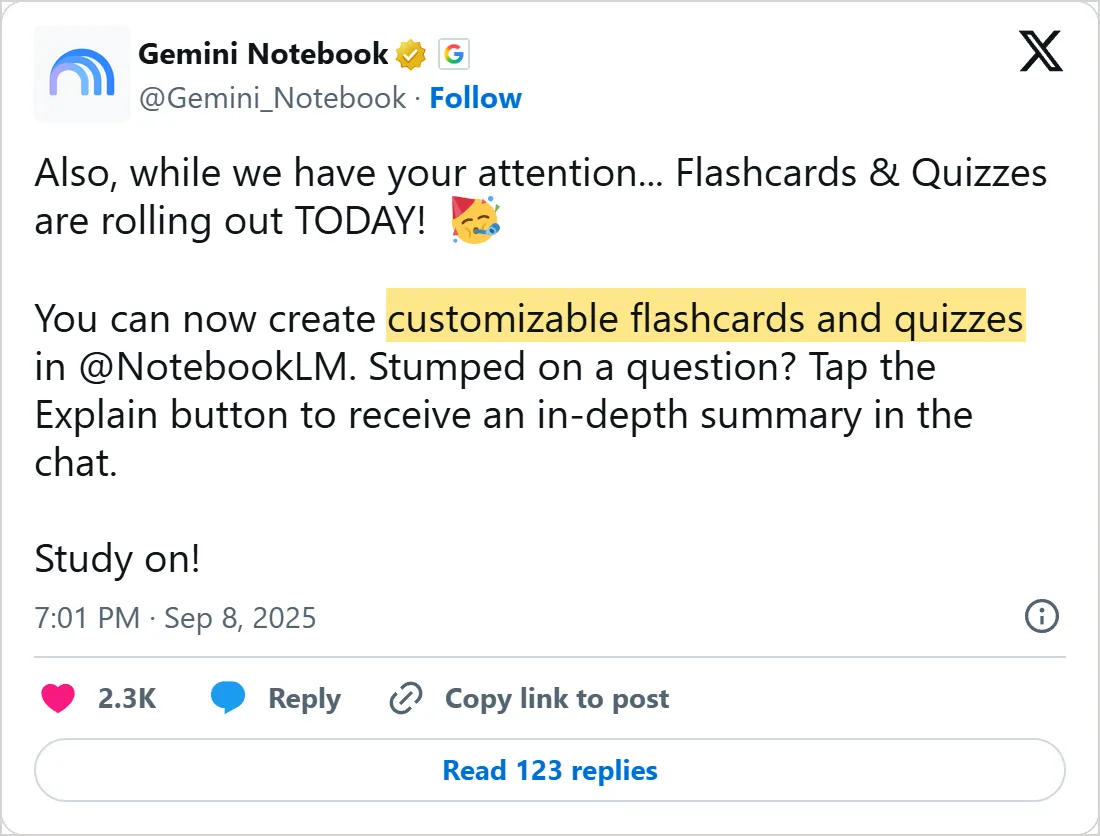
A screenshot of X's own embed of the post, taken on 6 November 2026, with the time in UTC. Select it to open the post on X.
Move the cards to Anki
Anki is a flashcard program that schedules each card for review depending on how you rate your recall. It imports plain text files, so any chat app can feed it. Ask the app: "Put these cards in a text file, one card per line, the front, a tab, then the back, with no header row."
The Anki manual says the file must be plain text in UTF-8, with fields separated by commas, semicolons or tabs, and that Anki reads the first line to count the fields. To import, click the File menu, then Import. The sample below uses header lines the manual lists for Anki 2.1.54 and later, and its two cards are our own examples.
The first field decides what counts as a duplicate. Import the same file twice and, by default, Anki updates the matching notes instead of adding them again, and keeps the scheduling of their cards. If you open the file in a spreadsheet first, the manual recommends LibreOffice over Excel, because Excel handles UTF-8 and multi-line fields poorly. OpenAI Academy adds that its College Student plugin can write flashcards as an Anki-ready CSV.
#separator:tab
#html:false
#notetype:Basic
#deck:Biology notes
What does a ribosome do?	It builds proteins.
Where are proteins made in a cell? At ribosomes.| Card shape | What the file holds | What Anki does |
|---|---|---|
| Question and answer | Two fields on one line | Makes one note with two fields. In the import window you map them, for example to Front and Back on the Basic note type |
| Fill in the blank | "Canberra was founded in {{c1::1913}}." | Needs the Cloze note type, and hides 1913 as [...] on the question |
| Two blanks | "{{c2::Canberra}} was founded in {{c1::1913}}." | Makes two cards, one hiding each word |
| Tags | A third field of tags | Pick it as the tags field in the import window |
Rate your recall honestly
After Anki shows an answer, you press one of four buttons: Again, Hard, Good or Easy. The manual says to be strict: if a partly right answer would count as a fail outside Anki, it counts as Again.
It also says how often to expect each button. If you press Again far more often than that, the cards may be too big or too vague for now. That reading is Mindket's, not the manual's, and splitting or rewriting a card is worth a try.
5-20%
of the time on Again, for a wrong answer or one you could not recall
Source: Anki manual: Studying (read November 6, 2026)
80-95%
of the time on Good, which should be the most common button
Source: Anki manual: Studying (read November 6, 2026)
Common mistakes
- Making cards from a summary instead of from your notes. A summary has already dropped details the exam may ask for.
- Putting a paragraph on one card. If you cannot answer it in a sentence, split it.
- Saving the file as Excel or Word. Anki wants plain text, saved as UTF-8, and a spreadsheet exported as CSV from LibreOffice.
- Trusting the cards without a check. OpenAI Academy says not to assume a summary is perfect just because it is fast.
Try it yourself
- Paste one page of notes and run the quiz prompt for five questions. Write down the two you missed.
- Ask for ten flashcards from the same page, delete the three weakest, and rewrite one by hand.
- Save the cards as the sample file shows, import them into Anki and press Good or Again honestly on the first review.
Next: learn a language with AI
The same habits carry over to a language: ask, answer in your own words, and check. Learn a language with AI adds voice practice and role play.
Check yourself
Which part of a prompt turns a chat into retrieval practice?
Show answer
A. Quiz me one question at a time and wait for my answer before feedback Asking one question at a time and waiting makes you pull the answer from memory before the app responds.
You import the same text file into Anki twice. What does Anki use by default to spot a duplicate?
Show answer
D. The first field The manual says Anki uses the first field to decide whether a note is unique, and by default it updates the matching note.
How does Anki write a hidden word in a fill-in-the-blank card?
Show answer
B. {{c1::1913}} A cloze deletion is written as {{c1::1913}}, and the card shows [...] on the question.
How often does the Anki manual say you will typically press Again?
Show answer
C. About 5 to 20% of the time The manual says Again is typically used about 5 to 20% of the time, and Good, the most common button, about 80 to 95%.
Frequently asked questions
Can ChatGPT make flashcards?
Yes, from a topic you name or from notes you upload. The deck opens as cards you tap to flip, and it is saved in your library so you can come back to it.
How do I turn my notes into a quiz with AI?
Put the notes in the chat, then paste the prompt from the first section. It asks one question, waits, and gives feedback before the next. Tell it to stay inside your notes, and every question stays on your material.
Does NotebookLM make flashcards?
Yes. They arrived in September 2025, and you can edit the cards afterwards. Tap Explain when a question stumps you, and the chat gives a longer answer.
How do I import AI flashcards into Anki?
Ask the app for a tab-separated text file, then use Import on Anki's File menu. If Anki splits the fields wrongly, change the separator in the import window, or add a #separator header line to the file.
Are AI-made flashcards accurate?
Not always, and a fast answer is no proof. Compare each card with your notes and delete the ones they do not support.
Sources
- OpenAI Edu Prompt, Issue 5: interactive quizzes https://edunewsletter.openai.com/p/the-edu-prompt-issue-5
- OpenAI Edu Prompt, Issue 6: flashcards and quizzes https://edunewsletter.openai.com/p/the-edu-prompt-issue-6
- OpenAI Edu newsletter: Students go deeper with Custom GPTs (QuizEcon) https://edunewsletter.openai.com/p/students-go-deeper-with-custom-gpts
- OpenAI Academy: Turn Readings and Notes into Study Materials https://academy.openai.com/public/clubs/higher-education-05x4z/blogs/turn-readings-and-notes-into-study-materials-2026-05-18
- OpenAI Academy: Use the College Student Plugin to Create Interactive Study Materials https://academy.openai.com/public/clubs/higher-education-05x4z/blogs/college-student-plugin-interactive-study-materials
- Gemini Notebook (@Gemini_Notebook) on X: Flashcards and Quizzes https://x.com/Gemini_Notebook/status/1965128427196833806
- Gemini Notebook (@Gemini_Notebook) on X: editable flashcards https://x.com/Gemini_Notebook/status/2069132913866953098
- Gemini (@GeminiApp) on X: Quizzes https://x.com/GeminiApp/status/1953139151940854265
- Anki manual: Importing text files https://github.com/ankitects/anki-manual/blob/main/src/importing/text-files.md
- Anki manual: Importing https://github.com/ankitects/anki-manual/blob/main/src/importing/intro.md
- Anki manual: Editing (cloze deletion) https://github.com/ankitects/anki-manual/blob/main/src/editing.md
- Anki manual: Studying https://github.com/ankitects/anki-manual/blob/main/src/studying.md
- Wikipedia: Testing effect https://en.wikipedia.org/wiki/Testing_effect