
Before you start
You need a terminal, an internet connection for the downloads and room on disk. An open model is one whose weights you can download and run yourself. The weights are the large files that hold what the model learned, and they are what fills the disk. Ollama itself needs at least 4GB on Windows, and the Windows page warns that models can take tens to hundreds of gigabytes more.
A graphics card helps but is not required. The quickstart's first model wants about 8 GB of free VRAM, the memory on the graphics card, or that much unified memory on a Mac. With less, Ollama keeps part of the model in system RAM and answers arrive more slowly. Lesson 4 works out what fits your machine.
No account is needed for local models. The first launch offers a sign-in, but that is for cloud models, which run on ollama.com and need an API key when you call them from code. For a server with no desktop, Ollama also publishes an official Docker image, ollama/ollama, on Docker Hub.
Check your system against the platform pages:
- Windows 10 22H2 or newer, Home or Pro. NVIDIA cards need driver 551.61 or newer, and AMD cards a ROCm v7 driver or a Vulkan-capable Radeon driver.
- macOS Sonoma (14) or newer. Apple M-series Macs run models on the CPU and the GPU, and Intel Macs on the CPU only.
- Linux with
curlfor the install script. NVIDIA cards need compute capability 5.0 or newer and driver 550 or later.
Install Ollama on Windows, macOS and Linux
Ollama is built on llama.cpp, the open-source engine that also runs GGUF model files inside LM Studio, so most of what you learn about model files here carries over.
Whatever system you use, the ollama command talks to a small server on your own machine at 127.0.0.1:11434. On Windows and macOS the desktop app runs that server for you. On Linux it runs as a systemd service, or in a terminal with ollama serve.
The quickest install is one line. macOS and Linux share a shell script, and Windows has a PowerShell line, both from Ollama's README:
# macOS or Linux
curl -fsSL https://ollama.com/install.sh | sh

# Windows, in PowerShell
irm https://ollama.com/install.ps1 | iex

# then, in a new terminal
ollama -v- Windows: run the PowerShell line, or download OllamaSetup.exe and run it. It installs into your user account without administrator rights. To use another drive, start it as
OllamaSetup.exe /DIR="d:\some\location". - macOS: run the script, or open ollama.dmg and drag Ollama into Applications. When the app first starts, let it create the link in
/usr/local/bin, or the terminal will not findollama. - Linux: run the script. To install by hand instead, the Linux page extracts
ollama-linux-amd64.tar.zstinto/usrand sets up a systemd service with its ownollamauser. - Linux only: if a later command cannot reach the server, start it with
sudo systemctl start ollama, or runollama servein a second terminal and leave that window open.
To run Ollama as a Windows service, the Windows page offers ollama-windows-amd64.zip, which holds only the CLI and the NVIDIA libraries. A service wrapper such as NSSM then runs ollama serve.
Step by step, with screenshots
A first session in order, from the version check to unloading the model. The pictures show what the commands printed on a Windows PC.
Open a new terminal and run
ollama -v. A version line means Ollama is installed and the terminal can find it.
Run
ollama pull gemma4:e2bto download this lesson's model, about 7.2 GB, thenollama lsto list the models on your disk. The computer in the pictures already hadqwen2.5:7b, so they show that model. Typegemma4:e2bwherever they showqwen2.5:7b.
Run
ollama run gemma4:e2b "Why is the sky blue?"to ask one question without opening a chat. The first answer waits while Ollama loads the model. Leave out the quoted prompt and you get the>>>chat prompt instead.
Run
ollama psstraight away. It lists the models held in memory. The fourth column says where each one runs, and here it reads96%/4% CPU/GPU, so most of the model sits in system RAM. The last column counts down to when Ollama unloads it.
Free the memory with
ollama stop gemma4:e2b, which prints nothing. A secondollama psnow shows only its header row, so no model is loaded.
Real output of Ollama 0.40.14 on Windows, shown in a terminal frame, taken on 6 November 2026.
Download a model and chat with it
Two commands get a model talking. ollama pull downloads it. ollama run loads it into memory and opens a chat in the terminal. The quickstart uses gemma4:e2b, one of the small editions of Gemma 4, and puts the download at about 7.2 GB.
The part after the colon is the tag. One model name covers several sizes and variants, and the tag picks one. The gemma4 page in Ollama's library lists them with their sizes, from e2b up to 31b. A bare name such as gemma4 means the tag the page marks as latest.
Sizes differ a lot from one tag to the next, as the chart at the end of this section shows, so read the size column before you pull.
Once the model loads you get a >>> prompt. Type a question and press Enter. To paste text over several lines, open and close it with three double quotes, as the CLI reference shows. /bye ends the chat.
A prompt in quotes after the model name skips the chat and prints one answer, which suits scripts. The same form reads pictures with a model that accepts them: put the file path inside the prompt, as the CLI reference does with ollama run gemma4 "What's in this image? /Users/jmorgan/Desktop/smile.png".
Not every model writes text. An embedding model turns text into a list of numbers that search tools compare, and ollama run embeddinggemma "Hello world" prints that list as a JSON array. What embeddings are covers why a search index wants them.
Ending the chat does not free the memory. Ollama keeps a model loaded for 5 minutes after its last request, so the next prompt skips the loading step. OLLAMA_KEEP_ALIVE changes that wait for every model. To load a model before you need it, run it with an empty prompt: ollama run gemma4:e2b "".
Typing ollama with nothing after it opens a menu. It offers to run a model or to hand your local models to a tool you already use. Behind that menu sits ollama launch, which sets up and starts OpenCode, Claude Code, Codex, VS Code or Droid against your own server. Run it from your project folder, as in ollama launch claude, and pick a model when it asks. Add --model gemma4:e2b to skip the question, or --config to write the settings without starting the tool.
ollama pull gemma4:e2b
ollama run gemma4:e2b

# one prompt, one answer, no chat
ollama run gemma4:e2b "Why is the sky blue?"Source: Ollama library: gemma4 (read November 5, 2026)
Manage models and find where they are stored
Two lists tell you what Ollama is holding. ollama ls shows every model on disk. ollama ps shows the ones loaded in memory, and that is the list to check when the computer slows down.
Memory fills faster than people expect. By default Ollama keeps up to three models loaded per GPU, or three on a machine without one. An afternoon of trying models can leave several sitting in memory at once, and ollama stop unloads one straight away.
In the ps output, the PROCESSOR column says where the model sits. CONTEXT says how many tokens of conversation the model has room for. A token is a piece of text, often part of a word. More context costs more memory, so a model that fits with a short context can spill over with a long one.
Deleting is final. A model you remove with ollama rm has to be pulled again, download and all.
The model files sit in one folder per computer. To move them to a bigger drive, set OLLAMA_MODELS to the new folder, then quit and restart Ollama so it reads the variable. On Windows the uninstaller leaves a moved folder in place, so delete it yourself if you remove Ollama.
The rest of Ollama lives elsewhere. On Windows the program sits in %LOCALAPPDATA%\Programs\Ollama, while %LOCALAPPDATA%\Ollama holds the logs and downloaded updates. When something fails, the server log usually says why. Open server.log in that folder on Windows, or run journalctl -e -u ollama on Linux.
ollama ls                 # models on disk
ollama ps                 # models in memory, with PROCESSOR and CONTEXT
ollama stop gemma4:e2b    # unload it now
ollama rm gemma4:e2b # delete it from disk100% GPU: the whole model is in video memory, which is where it runs fastest.100% CPU: the model runs entirely from system RAM.48%/52% CPU/GPU: part of the model did not fit on the card and sits in system RAM. A smaller tag or a shorter context can bring it back to100% GPU.
| System | Default model folder | Where to set OLLAMA_MODELS |
|---|---|---|
| macOS | ~/.ollama/models | With launchctl, when Ollama runs as the app |
| Linux | /usr/share/ollama/.ollama/models | In the systemd service, with systemctl. The ollama user needs read and write access to the new folder |
| Windows | C:\Users\%username%\.ollama\models | In your account's environment variables, then quit and relaunch the tray app |
How Ollama's own account announces a new model family
Ollama's account on X announced the Qwen 3.5 small models in March as a list of ollama run lines, one per size: qwen3.5:9b, 4b, 2b and 0.8b. It said every one of them supports tool calling, thinking and image input in Ollama.
Those are the same run commands this lesson used, so a new model is one line away once it reaches the library. The library page still lists all four sizes, with 9b as the latest tag and 0.8b as a download of little more than a gigabyte.
To try the family on a modest machine, start with ollama run qwen3.5:0.8b. Move up a size while ollama ps still shows 100% GPU, and stop at the first one that spills into system RAM. For a tour of the desktop app itself, Sam Witteveen covers it in the video below.
All models support native tool calling, thinking, and multimodal capabilities in Ollama.
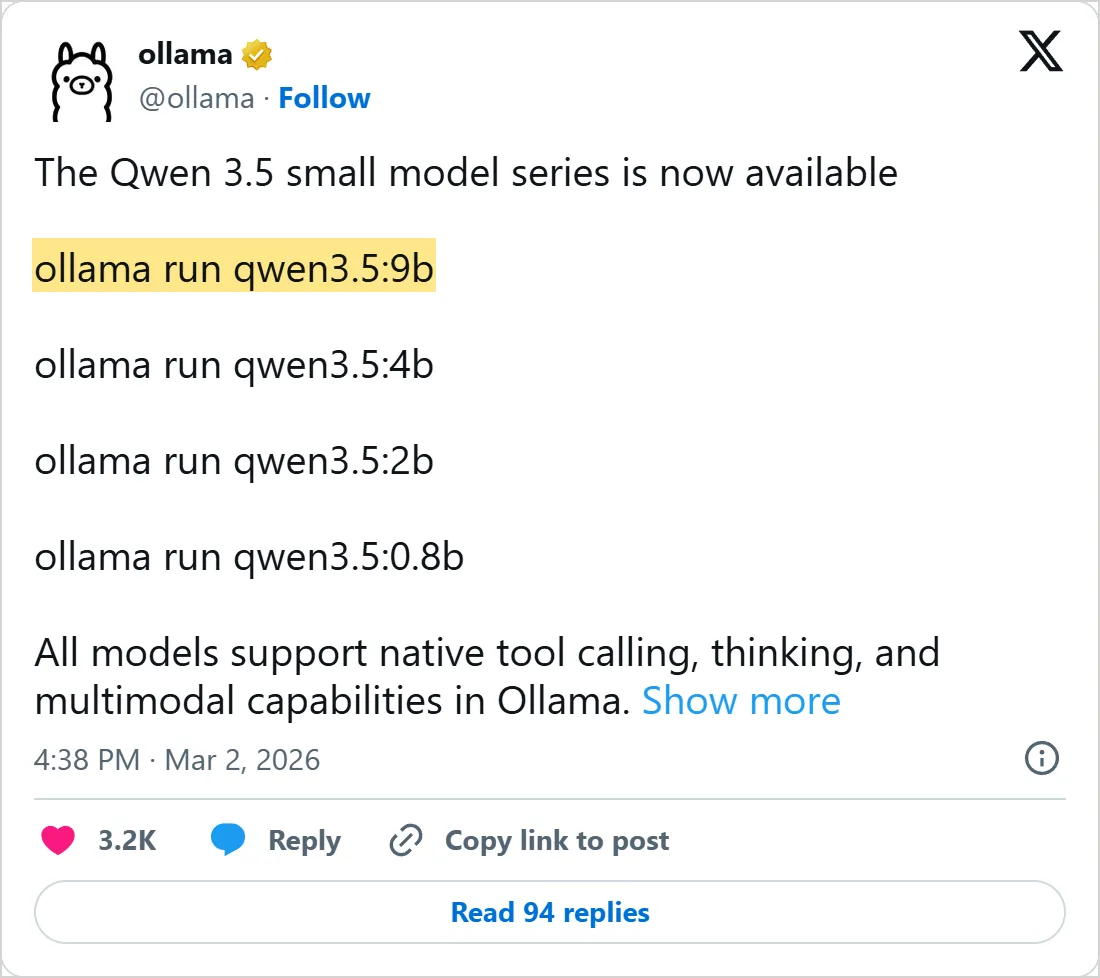

A screenshot of X's own embed of the post, taken on 5 November 2026, with the time in UTC. Select it to open the post on X.
Common mistakes
- Pulling the biggest tag first. If the model does not fit in video memory, part of it runs from system RAM and every answer slows down. Start with a small tag and move up once it runs well.
- Pasting a long document into a model at the default context. With less than 24 GiB of VRAM, Ollama gives each model room for 4k tokens, while its context page asks for at least 64000 for agents and coding tools. Raise it with the slider in the app settings or with
OLLAMA_CONTEXT_LENGTH. - Setting
OLLAMA_MODELSorOLLAMA_HOSTin one terminal while the app or the service keeps its old environment. Restart Ollama after any change. - Opening the server to the network with
OLLAMA_HOST=0.0.0.0:11434and no firewall rule. Local requests need no API key, so anyone who reaches the port can use your models and your GPU. - Picking a cloud model when you meant a local one. Cloud models need
ollama signinand run on Ollama's servers, and the FAQ says prompts sent to them are processed there. For local models it says Ollama does not see your prompts or data. - Unzipping the Windows standalone build over an older copy. The Windows page says to remove the old directories first.
- Closing the chat and expecting the memory back at once. The model stays loaded until its keep-alive time runs out, so run
ollama stopbefore you start a game or a video export.
Try it yourself
- Pull two tags of one model, run
ollama lsand compare their sizes on disk. - Ask one question, then run
ollama psstraight away and again six minutes later. Did the model leave the list on time? - Move the model folder: set
OLLAMA_MODELS, restart Ollama, pull a small model and watch the new folder fill. - Run
ollama serve --helpand find the variable that sets the address the server listens on. - Give a vision model a screenshot path inside the prompt and ask what the window shows.
- Restart Ollama and time two prompts in a row. Which one waited for the model to load?
- Remove your test models with
ollama rm. Doesollama lsstill show them?
Next: every command in this lesson went through the local server, and your own programs can use it the same way. Lesson 2 sends prompts to it with curl and Python, streams the reply and points the OpenAI SDK at your computer instead of a cloud service. If privacy brought you here, the AI privacy lesson shows what hosted chat apps keep from your conversations.
Check yourself
Which command shows the models loaded in memory right now?
Show answer
B. ollama ps ollama ps lists the running models with their PROCESSOR and CONTEXT columns, while ollama ls lists what is on disk.
You want the model files on a bigger drive. What do you set?
Show answer
C. OLLAMA_MODELS OLLAMA_MODELS names the folder that holds the models, and Ollama reads it after a restart.
The PROCESSOR column reads 48%/52% CPU/GPU. What does it mean?
Show answer
A. Part of the model sits in system RAM because it did not fit on the card A split means the model was loaded partly onto the GPU and partly into system memory.
On Linux, ollama run cannot reach the server. What do you try first?
Show answer
D. Start the server with ollama serve or the systemd service The command talks to a local server, and on Linux you start it with ollama serve or systemctl.
Frequently asked questions
Does Ollama work offline?
Yes, once a model is on disk. Pulling models needs the internet, and the desktop app on macOS and Windows downloads its own updates when it can, but a local model answers with the network cable out. Cloud models are the exception, since they run on ollama.com.
How do I update Ollama?
The desktop app on a Mac or a Windows PC fetches new versions by itself. Linux has no updater, so you upgrade by running the same install script again, the one-line curl command from the install step.
Can I run a model from Hugging Face with Ollama?
Yes. Point ollama run at hf.co/{username}/{repository} for any GGUF repository on the Hub, and add a tag such as :Q8_0 to pick a quantization. Without a tag, Ollama takes Q4_K_M when the repository has it, and lesson 4 explains what those names mean. Private repositories work too once you add the key in ~/.ollama/id_ed25519.pub to your Hugging Face account as an SSH key.
How do I uninstall Ollama?
On Windows, remove it under Add or remove programs. On macOS, delete the app, the /usr/local/bin/ollama link, the ~/.ollama folder and the cache folders the macOS page lists. On Linux, stop and disable the service, then remove the binary, its libraries and /usr/share/ollama.
Sources
- Ollama Docs: Quickstart https://docs.ollama.com/quickstart
- Ollama Docs: Windows https://docs.ollama.com/windows
- Ollama Docs: macOS https://docs.ollama.com/macos
- Ollama Docs: Linux https://docs.ollama.com/linux
- Ollama Docs: CLI reference https://docs.ollama.com/cli
- Ollama Docs: FAQ https://docs.ollama.com/faq
- Ollama Docs: Hardware support https://docs.ollama.com/gpu
- GitHub: ollama/ollama https://github.com/ollama/ollama
- Ollama library: gemma4 https://ollama.com/library/gemma4
- Hugging Face Docs: Use Ollama with any GGUF model on the Hub https://huggingface.co/docs/hub/ollama
- Ollama library: qwen3.5 https://ollama.com/library/qwen3.5
- Ollama on X: the Qwen 3.5 small model series is now available https://x.com/ollama/status/2028510184788926567
- Sam Witteveen on YouTube: Ollama Gets a New App https://www.youtube.com/watch?v=xN4Q98CbqqE