
Before you start
You need a skill folder to install: the reviewing-api-changes skill from lessons 1 to 3, or any skill you downloaded. Claude Code covers the main steps, and the other agents are optional. A terminal and a text editor are enough until the plugin section.
Every path and command here comes from the pages under Sources, read on 4 November 2026 and checked again on 5 November. This lesson is not hands-on testing.
Install a skill in Claude Code in five steps
Claude Code has two places for a skill you install by hand. A personal skill lives in ~/.claude/skills/reviewing-api-changes/SKILL.md and loads in all your projects on this machine. A project skill lives in .claude/skills/reviewing-api-changes/SKILL.md, loads in sessions in that repository, and travels with it once you commit it. Claude Code's skills documentation lists both.
# Personal: every project on this machine
mkdir -p ~/.claude/skills
cp -r reviewing-api-changes ~/.claude/skills/

# Project: this repository, committed for your team
mkdir -p .claude/skills
cp -r reviewing-api-changes .claude/skills/
git add .claude/skills/reviewing-api-changes
- Open the skill before you copy it. Read
SKILL.md, then every script and reference file in the folder. Anthropic advises checking all bundled files for unexpected network calls or file access that doesn't match the skill's purpose. - Check the folder.
SKILL.mdhas to sit directly inside it, and the folder name should match thenamein the frontmatter, as the specification requires. - Copy the folder into
~/.claude/skills/to use it in every project, or into.claude/skills/to use it in one repository. Claude Code watches both, so you don't restart. - Ask
What skills are available?and look for the skill. Then ask for something its description matches, or run it directly as/reviewing-api-changes. - For a project skill, commit the folder. Everyone who clones the repository gets it. To reach people outside the repository, package the skill as a plugin, as the plugin section below shows.
Where each agent looks for skills
The format is shared. One folder can work in several agents, and they differ in where they scan. The timeline below shows when Codex and Cursor took up the format, and the matrix lists five folders and which agent names each one. "Not listed" means the agent's docs page doesn't name that folder, which isn't the same as saying it fails.
Cursor reads .cursor/skills/ and ~/.cursor/skills/ as well, and Gemini CLI reads .gemini/skills/ and ~/.gemini/skills/. VS Code's Copilot sessions use .github/skills/ and ~/.copilot/skills/, and its Local chat sessions also read the .claude and .agents folders.
- Codex: run
$skill-installerwith a curated skill's name, such as$skill-installer linear, or drop the folder into.agents/skills. Codex scans that folder from where you launch it up to the repository root, so a skill at the root applies to every subfolder. The Codex skills post goes through the installer in detail. - OpenClaw has its own registry and an
openclawcommand, which the OpenClaw skills post covers. - Cursor takes skills from a GitHub repository only through a plugin, and the repository needs a
.cursor-plugin/marketplace.json. Type/in Agent chat to run a skill by name. Cursor rules are a separate feature: saved instructions Agent reads at the start of a conversation. - Gemini CLI installs from a git URL with
gemini skills install https://github.com/user/repo.git. Add--scope workspaceto keep the skill local to the project and--pathto name a sub-directory of the repository. - The
--consentflag on that command skips Gemini CLI's interactive security confirmation, so leave it off until you have read the skill. - VS Code: type
/skillsin chat with Local selected to open the Configure Skills menu.
Skills arrive in Claude
Anthropic introduces Skills in claude.ai, Claude Code and the API.
Source: Alex Albert on X: introducing Skills, 16 October 2025 (read November 5, 2026)
Codex supports skills
OpenAI says Codex now officially supports skills.
Source: OpenAI Developers on X: Codex supports skills, 19 December 2025 (read November 5, 2026)
Cursor adds Agent Skills
Agent Skills reach Cursor.
Source: Cursor on X: Agent Skills in Cursor, 23 January 2026 (read November 5, 2026)
The standard moves to a foundation
Anthropic donates the Agent Skills name, logo, GitHub organization and agentskills.io domain to the Agentic AI Foundation. By then more than 70 agent platforms had integrated Agent Skills.
Source: Anthropic: Donating Agent Skills to the Agentic AI Foundation (read November 5, 2026)
| Claude Code | Codex | Cursor | Gemini CLI | VS Code (Local chat) | |
|---|---|---|---|---|---|
| .claude/skills/ in a project | Yes | not listed | Yes | not listed | Yes |
| .agents/skills/ in a project | not listed | Yes | Yes | Yes | Yes |
| .github/skills/ in a project | not listed | not listed | not listed | not listed | Yes |
| ~/.claude/skills/ for you | Yes | not listed | Yes | not listed | Yes |
| ~/.agents/skills/ for you | not listed | Yes | Yes | Yes | Yes |
Sources: Claude Code docs: Skills (read November 5, 2026), OpenAI: Build skills (Codex) (read November 4, 2026), Cursor docs: Agent Skills (read November 4, 2026), Gemini CLI docs: Agent Skills (read November 4, 2026), VS Code docs: Agent Skills (read November 4, 2026)
Share skills with a plugin
A plugin is a folder of skills, agents, hooks and MCP servers with a manifest at .claude-plugin/plugin.json, and Claude Code loads it as one unit. That makes it the sharing route: teammates can install it, several projects can use the same copy, and you can publish it to a marketplace. Only name is required in the manifest. Put each skill at skills/review/SKILL.md in the plugin root. Skills saved inside .claude-plugin/ don't load, as the plugin guide warns.
Plugin skills carry the plugin's name, so /my-plugin:review and a standalone /review can both exist. To turn a project's skills into a plugin, copy .claude/skills into a new folder beside .claude-plugin/plugin.json. Then run claude plugin validate ./my-plugin, which checks the manifest and the frontmatter of every skill file and exits 0 when it passes. Try the plugin with claude --plugin-dir ./my-plugin.
You can hand a plugin over three ways: give people the folder or a zip of it, list it in a marketplace of your own, or submit it to Anthropic's directory. The install scope then decides who gets it. Claude Code plugins goes deeper on marketplaces.
Anthropic's skills repository shows the marketplace route: add the repository once, then install one of its bundles by name. Its README calls the skills demonstrations and tells you to test them in your own environment before relying on them.
Where to get skills
Use Skills only from trusted sources: those you created yourself or obtained from Anthropic.
/plugin marketplace add anthropics/skills
/plugin install example-skills@anthropic-agent-skills

# In a terminal, once per collaborator, after a project-scope entry is committed
claude plugin install <name>@<marketplace> --scope project
- A marketplace comes from a GitHub
owner/repo(add#refto pin a branch or tag), a git URL, a local path or a hostedmarketplace.json. Add it once, then install by name. - Auto-update is on by default for Anthropic's official marketplace and for marketplaces added from claude.ai, and off for the rest, including the community marketplace. A plugin from a third-party marketplace stays at its installed version until you run
claude plugin update my-plugin@my-marketplaceor turn auto-update on in the Marketplaces tab.
| Scope | Who gets the plugin | Where it is recorded |
|---|---|---|
| User | You, in every project on this machine | ~/.claude/settings.json |
| Project | Everyone who works in the repository, after each runs the install once | .claude/settings.json, which you commit |
| Local | You, in this repository only | .claude/settings.local.json |
Boris Cherny on plugin marketplaces, and how Codex and Cursor took up skills
Boris Cherny, who created Claude Code at Anthropic, put plugins third in a February 2026 thread of tips. A plugin can bring skills, MCP servers, agents, hooks and language servers in one install. His advice is to install from Anthropic's official marketplace, or to run a marketplace for your company. Then commit settings.json to the codebase, so the marketplace is added for your whole team. Each teammate still installs the plugin. The scope table above shows which settings file that is.
The folder you install reaches other agents because they adopted the same format. OpenAI Developers posted in December 2025 that Codex officially supports skills, which you can call by name with $ or let Codex pick from your prompt. Cursor announced in January 2026 that Agent Skills are available in Cursor. Before you copy a skill, pick a folder from the matrix that every agent you use reads, such as .agents/skills/ for Codex and Cursor. Then test it in each agent.
Install a plugin from the official Anthropic plugin marketplace, or create your own marketplace for your company.
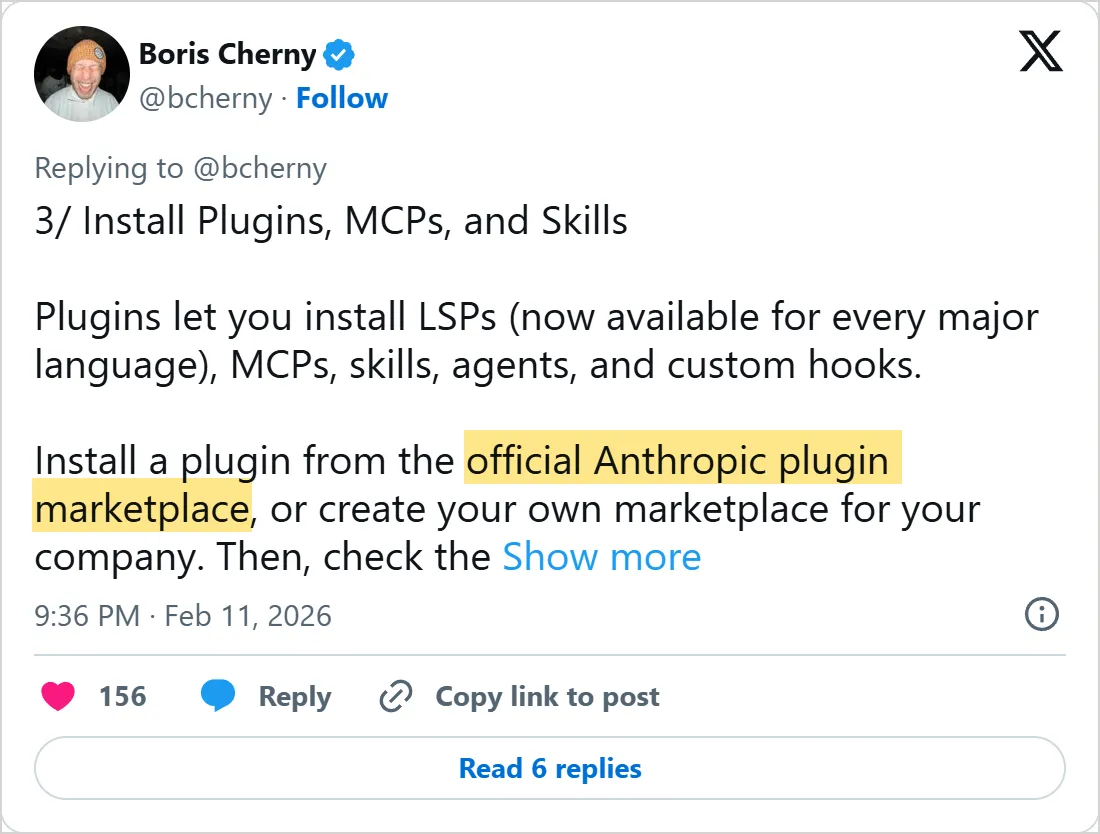
A screenshot of X's own embed of the post, taken on 5 November 2026, with the time in UTC. X cuts the post short with Show more. Select it to open the post on X.
Common mistakes
- Copying a whole repository into the skills folder. Each skill needs its own folder with
SKILL.mddirectly inside it, as in~/.claude/skills/reviewing-api-changes/SKILL.md. - Naming the folder one thing and the
namefield another. The specification says the two must match. - Committing a project-scope plugin entry and assuming the team has the plugin. The entry enables it, but each collaborator still runs the install once.
- Uploading a Claude Code skill to claude.ai unchanged. An upload accepts only
name,description,license,compatibility,metadataandallowed-tools, and any other frontmatter key makes it fail. - Treating a popular repository as a safe one. Anthropic singles out skills that fetch external URLs as a particular risk, because the fetched text can carry instructions, and even a trustworthy skill can be compromised if its external dependencies change over time.
Try it yourself
Install the reviewing-api-changes skill, or any skill you have, twice. Put it in the .claude/skills/ folder of a scratch repository and ask What skills are available?. Then copy it to ~/.claude/skills/ and ask again. Last, wrap the project copy in a plugin, load it with --plugin-dir and note how its command changes to /my-plugin:reviewing-api-changes.
Delete the scratch repository and the personal copy afterward. The test should leave nothing behind.
- Does the skill list from both places, and which copy runs when you call it by name?
- Does the plugin copy show up under the plugin's name?
- Did you open every file in the skill before you copied it?
Next: Claude Code advanced
That closes the Agent Skills course. You can now write, test and install a skill, so the natural next step is to tune the agent that runs it. Claude Code advanced starts with the settings files, then moves on to headless runs, CI and the Agent SDK.
Skills tell an agent how to do a job. The MCP course comes later and covers the servers that give it tools and data to do the job with.
Check yourself
In Claude Code, which path holds a personal skill that loads in all your projects?
Show answer
B.
~/.claude/skills/reviewing-api-changes/SKILL.mdA personal skill lives in~/.claude/skills/and loads in every project on the machine, while.claude/skills/belongs to one repository.You copied a whole downloaded repository into
~/.claude/skills/and no skill loads. What is the likely mistake?Show answer
D. Each skill needs its own folder with
SKILL.mddirectly inside it A skill is one folder withSKILL.mddirectly inside, as in~/.claude/skills/reviewing-api-changes/SKILL.md.You committed a project-scope plugin entry in
.claude/settings.json. What must each collaborator still do?Show answer
A. Run the plugin install once The committed entry enables the plugin, but each collaborator still runs the install once.
What should you do before you copy a downloaded skill into your skills folder?
Show answer
C. Read
SKILL.mdand every script and reference file in it Anthropic advises checking all bundled files for unexpected network calls or file access that does not match the skill's purpose.
Frequently asked questions
What if my new skill doesn't show up in Claude Code?
If the top-level skills folder didn't exist when the session started, run /reload-skills, because Claude Code isn't watching it yet. Otherwise run with --debug to see a frontmatter parse error. Malformed YAML still loads the skill body, but with empty metadata, so Claude can't match the description.
What happens when two skills share a name?
In Claude Code, enterprise beats personal and personal beats project, so a personal deploy runs instead of a project one. A plugin skill and a standalone skill both load, since the plugin's name prefixes its commands. Codex doesn't merge same-name skills, and both can appear in its selectors. Gemini CLI uses the higher-precedence location, with workspace above user.
Can I keep one copy of a skill for several agents?
Codex follows symlinked skill folders when it scans its locations, so a symlink in .agents/skills/ can point at a skill you keep elsewhere. Cursor also reads .codex/skills/ and ~/.codex/skills/, for compatibility with Codex.
How do I remove a skill?
In Claude Code, delete the folder and the session picks up the change. A plugin comes out with claude plugin uninstall my-plugin@my-marketplace, with --scope to name the scope. Gemini CLI has /skills disable followed by the skill name. Codex turns a skill off with a [[skills.config]] entry that sets enabled = false, then needs a restart.
What does an agent show me before it installs a skill?
In a Claude Code session, /plugin install opens the plugin's details first and lists the commands, agents, skills, hooks and MCP servers it will add, so you can choose a scope. Gemini CLI asks for confirmation on install unless you pass --consent, and on activation it shows the skill's name, purpose and directory.
Will claude.ai or the API see my Claude Code skills?
No. Anthropic says custom skills don't sync across surfaces. A skill uploaded to claude.ai has to be uploaded to the API again. Claude Code skills are separate from both. claude.ai takes a zip, one user at a time, while API skills are shared across a workspace.
Sources
- Claude Code docs: Skills https://code.claude.com/docs/en/skills
- Claude Code docs: Install and manage plugins https://code.claude.com/docs/en/discover-plugins
- Claude Code docs: Create a plugin https://code.claude.com/docs/en/plugins/create
- Claude Platform docs: Agent Skills overview https://platform.claude.com/docs/en/agents-and-tools/agent-skills/overview
- Anthropic skills repository https://github.com/anthropics/skills
- Agent Skills specification https://agentskills.io/specification
- OpenAI: Build skills (Codex) https://learn.chatgpt.com/docs/build-skills
- Cursor docs: Agent Skills https://cursor.com/docs/context/skills
- Gemini CLI docs: Agent Skills https://github.com/google-gemini/gemini-cli/blob/main/docs/cli/skills.md
- VS Code docs: Agent Skills https://code.visualstudio.com/docs/copilot/customization/agent-skills
- Boris Cherny on X: tip 3, install plugins, MCPs and skills, 11 February 2026 https://x.com/bcherny/status/2021699862522364149
- Alex Albert on X: introducing Skills, 16 October 2025 https://x.com/alexalbert__/status/1978877498411880550
- OpenAI Developers on X: Codex supports skills, 19 December 2025 https://x.com/OpenAIDevs/status/2002099762536010235
- Cursor on X: Agent Skills in Cursor, 23 January 2026 https://x.com/cursor_ai/status/2014753596223770841
- Anthropic: Donating Agent Skills to the Agentic AI Foundation https://www.anthropic.com/news/donating-agent-skills-to-the-agentic-ai-foundation