
Before you start
You need the account and token habits from lesson 1, plus Python 3.10 or later. A provider here is a company that runs models on its own servers and bills per request, such as Groq, Together or Cerebras. Inference Providers puts 18 of them behind one Hugging Face account, so you never sign up with each. One account, one token, one bill.
The name causes confusion. Older tutorials call this the Hugging Face Inference API, or the serverless Inference API. Serverless means you call a model without renting or running a server yourself. That original service lives on under the name HF Inference, a provider like the others.
Since July 2025, HF Inference mostly serves models that run well on CPUs. Those include embedding models, which turn text into lists of numbers for search, text classifiers, and small older LLMs such as BERT and GPT-2. Large chat models run on the partner providers. Past any included credits, HF Inference bills by compute time on its hardware rather than by token.
Providers do not all offer the same tasks. Chat with text is the common case. Chat with images needs a VLM, a vision language model that reads pictures as well as text. Embeddings, image and video generation and speech to text each come from a shorter list. The table shows who offered what on the day this lesson was checked, and the overview keeps the current list.
Why call a hosted model at all? Lesson 2 showed the limit: a model has to fit in your memory. openai/gpt-oss-120b, the example below, has 120 billion parameters, far past a laptop. Through a provider, it takes one HTTP request. No download, no GPU. Every such call is billed to your account, so look at your billing page after the first few.
| Task | Providers offering it |
|---|---|
| Chat, text in and out | Baseten, Cerebras, Cohere, DeepInfra, Featherless AI, Fireworks, Groq, HF Inference, Novita, Nscale, OVHcloud AI Endpoints, Public AI, Scaleway, Together, Z.ai |
| Chat with images (VLM) | Baseten, Cohere, DeepInfra, Featherless AI, Fireworks, Groq, HF Inference, Novita, Nscale, OVHcloud AI Endpoints, Together, Z.ai |
| Embeddings | HF Inference, Scaleway, Together |
| Text to image | Fal AI, HF Inference, Nscale, Replicate, Together, WaveSpeedAI |
| Text to video | Fal AI, Novita, Replicate, Together, WaveSpeedAI |
| Speech to text | Fal AI, HF Inference, Replicate, Together |
Make a token and send your first request
The shortest route is InferenceClient from huggingface_hub, the library from lesson 1. It finds your saved token, picks a provider and shapes the request the way that provider expects. The code is the Inference Providers quickstart as published. It needs no base_url, and on a signed-in machine no token argument either. To compare models with your own prompts before writing any, open the Inference Playground.
import os
from huggingface_hub import InferenceClient

client = InferenceClient()

completion = client.chat.completions.create(
    model="openai/gpt-oss-120b",
    messages=[
        {
            "role": "user",
            "content": "How many 'G's in 'huggingface'?"
        }
    ],
)

print(completion.choices[0].message)- Make a token for this job. In your settings, create a fine-grained token and tick Make calls to Inference Providers. A token with only that permission can call models and do nothing else.
- Install the library with
pip install huggingface_hub. Put the token in theHF_TOKENenvironment variable, or save it withhf auth login --token $HF_TOKENas in lesson 1. - Run the script.
InferenceClient()takes no arguments here: the token comes from your environment or sign-in, and the provider is chosen for you. - Read the reply. The field
completion.choices[0].messageholds the role and text of the answer, and its.contentis the text alone. Afinish_reasonfield says why the model stopped, for example on reachingmax_tokens. Thecompletion.usagefield counts prompt, completion and total tokens, the units providers bill by. - Stream the next reply. Add
stream=Trueto the call and loop over what it returns, printing eachchunk.choices[0].delta.contentas it arrives. - Change the
modelstring to another Hub id, such asdeepseek-ai/DeepSeek-R1, and run it again. Copy the id from the model's Hub page, never from the provider's own catalog.
Call it with the OpenAI client or plain HTTP
Code written for OpenAI's Python client needs two changes. Point base_url at https://router.huggingface.co/v1 and pass your Hugging Face token as api_key. The router is the Hugging Face endpoint that forwards each request to a provider. It speaks the OpenAI chat format, so the rest of your code stays as it was.
That endpoint handles chat only. Images, embeddings and speech go through InferenceClient, which has one method per task. The docs' image example calls text_to_image with black-forest-labs/FLUX.1-dev.
The swap also works the other way. InferenceClient copies the OpenAI syntax: client.chat.completions.create is an alias of its own chat_completion, and api_key and base_url are aliases of token and model. Moving existing code to InferenceClient is a two-line change.
Both clients take the same chat options. The max_tokens option caps the reply, and temperature runs from 0 to 2. The stop option takes up to four sequences, and seed fixes the random sampling. Setting tools turns on function calling, where the model asks your code to run a function you described. Setting response_format asks for JSON that fits a schema.
With stream=True, the reply arrives in chunks of text as the model writes them. Code built on asyncio can use AsyncInferenceClient, which takes the same calls. For images, text_to_image returns a picture object you save with one call to its save method.
The same client also talks to servers on your own machine. InferenceClient(model="http://localhost:8080") sends chat requests to any local server with an OpenAI-compatible API, such as llama.cpp, vLLM, LiteLLM or TGI. Nothing leaves your computer and nothing is billed, which makes it a handy test bed before you spend credits.
Set one option in every script you deploy. By default, InferenceClient waits indefinitely for a reply. InferenceClient(timeout=30) gives up after 30 seconds and raises InferenceTimeoutError, which your code can catch and retry. Thirty seconds suits a short chat reply, while summarizing a long document may need more, so set it per job.
import os
from openai import OpenAI

client = OpenAI(
    base_url="https://router.huggingface.co/v1",
    api_key=os.environ["HF_TOKEN"],
)

completion = client.chat.completions.create(
    model="deepseek-ai/DeepSeek-R1:fastest",
    messages=[{"role": "user", "content": "Hello!"}],
)

print(completion.choices[0].message.content)| Way in | What you install | Tasks | How you pick a provider |
|---|---|---|---|
InferenceClient | huggingface_hub | Chat, images, embeddings, speech and more | provider="novita", or a suffix on the model id |
| OpenAI client | openai | Chat only, through the router | A suffix on the model id, such as :cheapest |
curl or requests | Nothing extra | Chat only, through the router | A suffix on the model id |
Pick a provider and know who bills you
Two numbers describe a provider for a given model. Throughput is how many tokens per second it writes once it starts. Latency is how long you wait for the first token. The router's model list at GET /v1/models reports both where known, with each provider's context length.
Leave the provider out and the request goes to the fastest one serving that model, measured by throughput. The overview calls this the :fastest policy. With automatic selection, a request also moves to another provider when the first one is flagged as unavailable. That keeps an app answering through one company's outage, though the stand-in may reply at a different speed. In InferenceClient, the same choice is the provider argument, whose default is "auto".
One page disagrees. The huggingface_hub inference guide says "auto" takes the first provider in your own order from the Inference Providers settings page. Both pages were live on 5 November 2026. When the choice matters, for a contract, a data rule or steady latency, name the provider and the question goes away. Pinning costs one suffix.
Not every model runs everywhere. hf models ls --warm lists each model that at least one provider serves, and --json makes the list easy for scripts to read.
Requests routed through Hugging Face are billed by Hugging Face at the provider's rates, and any monthly credits apply first. You can also save your own key for a provider in your Inference Providers settings. Those calls are billed by the provider directly, and Hugging Face credits do not count.
In a Team or Enterprise organization, credits are shared by all members, but a request only uses them when it names the organization. Each person keeps their own token. Pass bill_to="my-org-name" to InferenceClient, or send the X-HF-Bill-To header with plain HTTP, and the request lands on the organization's bill. Enterprise organizations can also pull daily usage by member, model and provider from an API endpoint, for any window in the last 12 months.
18
partner providers in the overview's list
Source: Inference Providers overview (read November 5, 2026)
200+
models reachable through them
Source: Inference Providers: Pricing and billing (read November 5, 2026)
| Add to the model id | Which provider answers | Use it when |
|---|---|---|
:fastest | The one with the highest throughput, in tokens per second. It is the default | Speed matters most |
:cheapest | The one with the lowest price per output token | Cost matters most |
:preferred | The first available one in your order on the settings page | You have ranked providers yourself |
:groq, :together or another name | That provider and no other | You need the same provider on every call |
Célina Hanouti's tips for Inference Providers in VS Code
Célina Hanouti, an engineer at Hugging Face and co-maintainer of huggingface_hub, announced on X on 11 September 2025 that Inference Providers work inside GitHub Copilot Chat in VS Code. Open models such as Qwen3-Coder, gpt-oss and GLM-4.5 then sit in the editor's model picker, served by the same providers this lesson calls from Python.
The setup page asks for VS Code 1.104.0 or later and the HF Copilot Chat extension. Open the chat's model picker, choose Manage Models..., pick Hugging Face, paste your token, then tick the models you want.
On 30 October 2025 she added on X that each Copilot Chat request can go to the fastest or the cheapest provider, the same two policies as the :fastest and :cheapest suffixes. Her split: cheapest when price matters, fastest when throughput comes first.
For each model, you can explicitly choose "cheapest" when price matters
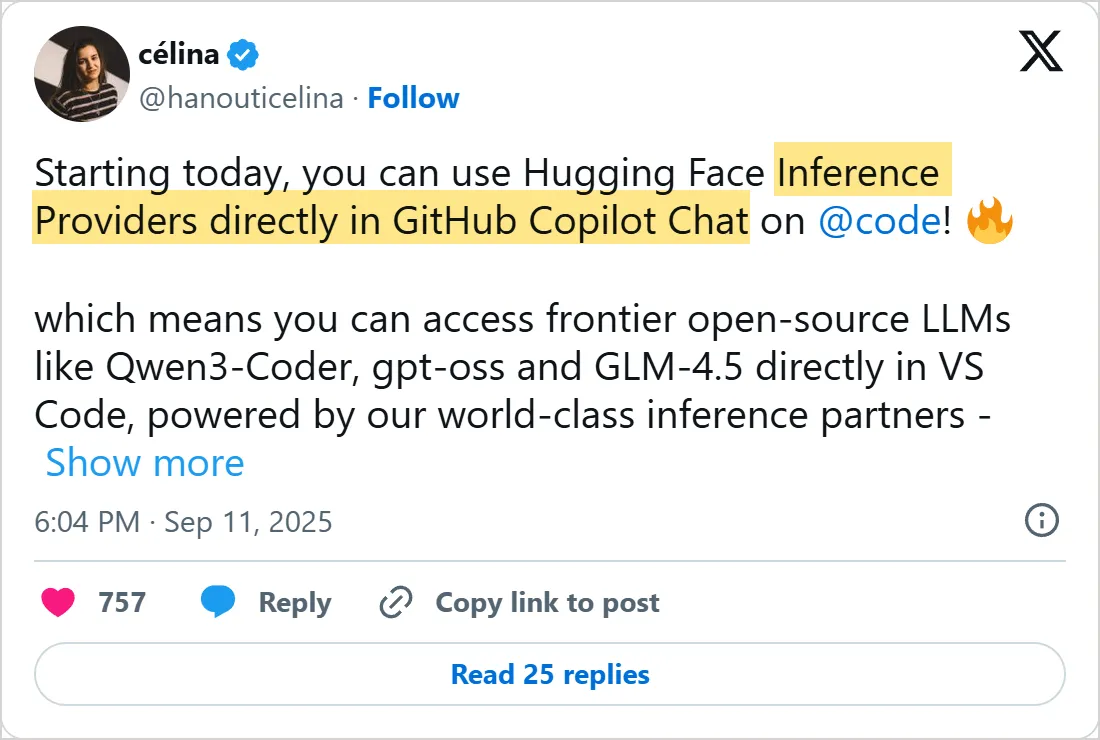
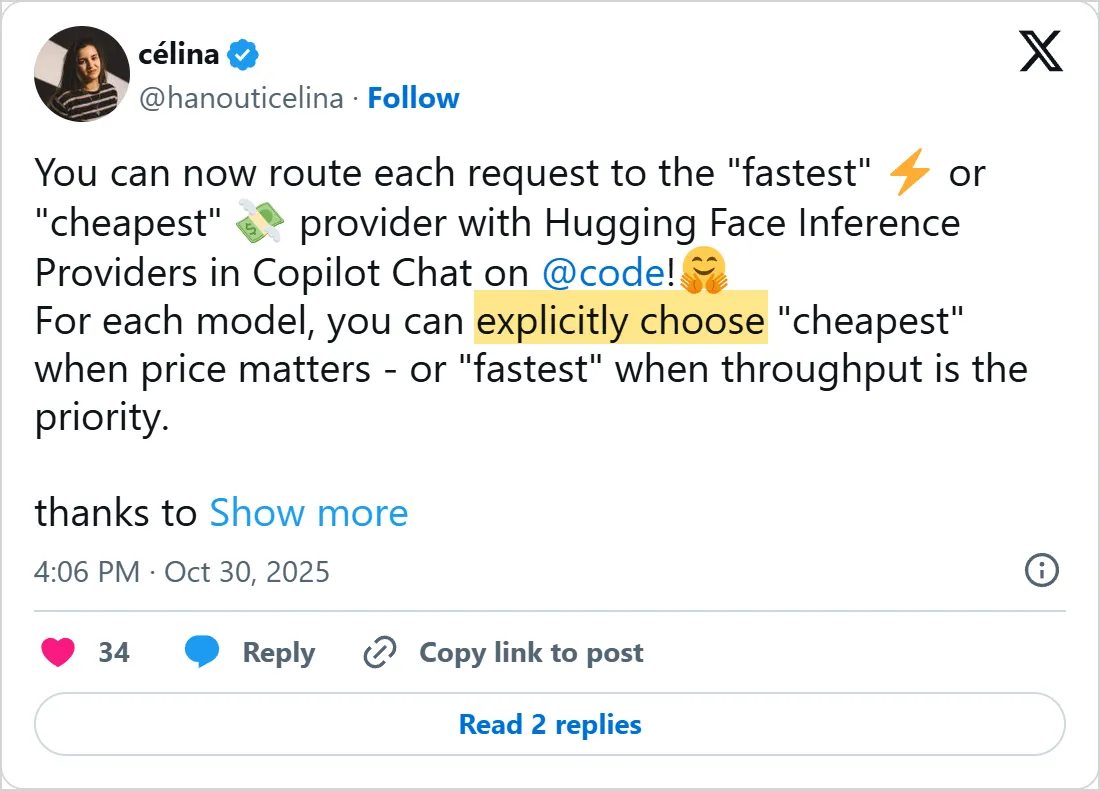
Screenshots of X's own embeds of the posts, taken on 5 November 2026, with the time in UTC. X cuts both posts short with Show more. Select one to open the post on X.
Common mistakes
- Pasting the token into the script. Every example reads it from
HF_TOKEN, which keeps it out of git and out of screenshots. - Writing a separate client for each provider. One token and one client reach all of them, and the provider is a single argument or suffix.
- Using a provider's own name for a model. The
modelvalue is the Hub id, such asopenai/gpt-oss-120b, whichever provider runs it. - Sending an image or embedding request to the router URL. That endpoint is chat only, so other tasks go through
InferenceClient. - Passing
provider=to the OpenAI client. That argument belongs toInferenceClient, and on the router you choose with a suffix on the model id. - Treating
:cheapestas a quality setting. It ranks providers by price per output token and says nothing about how good the replies are. - Leaving the timeout unset in a web app. A stuck call then holds a worker with no end in sight.
- Expecting the same provider on every call without a suffix. Automatic selection can move, and replies, speed and rate limits move with it.
- Passing both a URL and a provider to one client. The two exclude each other, since a URL points the client at a single server, such as
http://localhost:8080for a llama.cpp or vLLM server on your own machine.
Try it yourself
This curl call is the quickstart's raw HTTP version. Copy it as is. It only needs HF_TOKEN set in your shell, which makes it the quickest way to check a new token.
curl https://router.huggingface.co/v1/chat/completions \
    -H "Authorization: Bearer $HF_TOKEN" \
    -H 'Content-Type: application/json' \
    -d '{
        "messages": [
            {
                "role": "user",
                "content": "How many G in huggingface?"
            }
        ],
        "model": "openai/gpt-oss-120b:fastest",
        "stream": false
}'- Run it, then change
:fastestto:cheapest. Does the reply or the wait change? - Swap the suffix for a provider from the overview's partner list, such as
:groq. What comes back when that provider does not serve the model? - Set
"stream": trueand watch the reply arrive in pieces. - Run
hf models ls --warm, pick a smaller chat model from the list and ask it the same question. - If you belong to a Team or Enterprise organization, add
-H "X-HF-Bill-To: my-org-name"with its real name. Which bill does the request land on? - Fetch
https://router.huggingface.co/v1/modelsand compare the throughput and latency listed for two providers of one model.
Next
You can now run models on your machine and call bigger ones by API. Neither gives other people a way to try your work. Lesson 4 wraps a model in a Gradio app and publishes it as a Space, a page anyone can open. Sharing is the last step. That app can use InferenceClient too, so a Space with no GPU can still answer with a large model. Keep the token you made here, since a Space can hold it as a secret.
Check yourself
What is the old serverless Inference API called today?
Show answer
D. HF Inference, one of the providers The service was renamed HF Inference and now sits beside the partner providers.
Which model id do you send to a provider?
Show answer
A. The id on the Hugging Face Hub Requests to a provider name the model by its Hub id, whichever provider ends up running it.
What does adding :cheapest to a model id do?
Show answer
B. Picks the provider with the lowest price per output token Suffixes choose the provider: :fastest by throughput, :cheapest by price per output token.
How long does InferenceClient wait for a reply by default?
Show answer
C. Without limit, until you set timeout It waits indefinitely, so pass timeout and catch InferenceTimeoutError in anything you deploy.
Frequently asked questions
Is the Hugging Face Inference API free?
Not on a free account. Free users get no monthly credits and buy credits to make calls, while PRO accounts and Team or Enterprise organizations get monthly credits. Those credits are applied before any pay-as-you-go use, and they also cover Spaces hardware, Inference Endpoints and Jobs.
How do Inference Providers differ from Inference Endpoints?
Inference Providers share hosted models across many customers and bill per request. Inference Endpoints is a separate Hugging Face service that deploys a model on hardware reserved for you. InferenceClient can call both. An Endpoint suits steady traffic or a model no provider serves, and shared providers suit everything else.
Can I use Inference Providers from JavaScript?
Yes. Install @huggingface/inference and create an InferenceClient with your token, or point the openai JavaScript package at the router URL. The request shapes match the Python ones, and the JavaScript client takes the same provider option.
Can I cap what I spend on Inference Providers?
Organizations can. Team and Enterprise admins set a spending limit in the organization's settings and can switch off providers they do not want. The pricing page describes no cap for a personal account, so track usage on your billing page and keep max_tokens modest.
Sources
- Inference Providers overview https://huggingface.co/docs/inference-providers/index
- Inference Providers: Pricing and billing https://huggingface.co/docs/inference-providers/pricing
- Inference Providers: Chat completion https://huggingface.co/docs/inference-providers/tasks/chat-completion
- huggingface_hub: Run inference on servers https://huggingface.co/docs/huggingface_hub/guides/inference
- Hugging Face Hub: User access tokens https://huggingface.co/docs/hub/security-tokens
- Hugging Face: Inference Playground https://huggingface.co/playground
- Inference Providers: Use them with GitHub Copilot Chat in VS Code https://huggingface.co/docs/inference-providers/integrations/vscode
- Célina Hanouti on X: Inference Providers in GitHub Copilot Chat https://x.com/hanouticelina/status/1966201072390701298
- Célina Hanouti on X: fastest or cheapest provider in Copilot Chat https://x.com/hanouticelina/status/1983928520674852902