
Before you start
You need a document you may share with an AI app, and a chat app that takes files. This lesson follows Claude, Gemini and Copilot in Word, because their help pages state their limits. The steps are alike in other apps.
A PDF made from a word processor holds real text. A scan is a picture of pages, so a summary of one is the case to check hardest. If you can, start from the original file.
Summarize a document in five steps
The prompt below carries steps two to four. It is our own sample, so change the reader and the shape to fit your document.
Anthropic's advice for long documents
For long document tasks, ask Claude to quote relevant parts of the documents first before carrying out its task. This helps Claude focus on the relevant content and ignore the rest of the document.
Summarize the attached report for my manager, who has not read it and will skim it on her phone.

Give me:
1. Three bullet points, each under 25 words.
2. The one decision the report asks for.
3. Any numbers a reader could challenge, each with its page number.

Before you summarize, quote the sentences you rely on.
If something is not in the document, say "not in the document".- Attach the file. In Claude, click the + button at the lower left of the chat box, choose the option to add files or photos, and pick the file. You can also drag it into the window. In Gemini, enter your prompt at gemini.google.com, click Add files, choose Upload files, then select Submit. In Word, ask Copilot Chat to summarize the document.
- Say who the summary is for. "For my manager, who will skim it on her phone" tells the app how short and how plain to write.
- Describe the shape. Give the count and the length, such as three bullets under 25 words, and name the one thing you most need, such as the decision the report asks for.
- Ask for quotes and page numbers. Quotes let you find the source sentence in seconds. When you point to a page in a prompt, use the number your PDF viewer shows, not the number printed on the page. That is Claude's tip.
- Check three claims against the pages. Pick the numbers and the names a reader could challenge. If a quote is not on the page, ask the app to look again, and trust nothing else from that answer until it does.
File limits
Limits are why an upload fails or a summary comes back thin. The table gives the figures the three help pages state on 5 November 2026, and plans can change them.
A long document is where summaries go wrong. Google's page says a file that is too large can make Gemini miss details, and Claude's page tips you to split large documents into smaller sections. Summarize each part, then ask for a summary of the summaries.
| Claude | Gemini | Copilot in Word | |
|---|---|---|---|
| Files at once | Up to 20 per chat | Up to 10 per prompt | The document you have open |
| File size | 500 MB per file in a chat, 30 MB per file in a project | 100 MB per file, and 2 GB for a video | Not stated on the page |
| Length | PDFs up to 1,000 pages. Up to 100 pages it reads text and visuals such as charts, and beyond that text only | A 1 million token window covers about 1,500 pages of text. Past the window, answers can miss details | An automatic summary needs at least 200 words |
| File types | PDF, DOCX, CSV, TXT, HTML, ODT, RTF, EPUB, JSON and XLSX | Most file types | A Word document |
| Watch for | A document that is not a PDF is read as text only, so embedded images are skipped | If it fails to read a file, upload it again | It reads the whole document but does not always cite later parts |
Sources: Anthropic: Uploading files to Claude (read November 5, 2026), Google: Upload and analyze files in Gemini Apps (read November 5, 2026)
Word's automatic summary also needs a Microsoft Copilot work license and a document saved in OneDrive or SharePoint. Without them you can still ask Copilot for a summary.
Meeting notes work the same way
Paste the notes into the chat, or save them as a text or Word file and attach it. The ask is different: you want decisions, owners and dates, and you do not want the app to guess any of them. Tell it what to write when something is missing.
Below are my notes from today's team meeting.

List three things:
1. Decisions we made.
2. Tasks, each with an owner and a due date.
3. Open questions.

If an owner or a date is missing from my notes, write "missing" instead of guessing.

Notes:
[paste your notes here]Before you upload something private
A contract or a customer list is not a casual upload. The rows below are what Google and Anthropic say about their consumer apps on 4 November 2026. They describe consumer accounts. If your employer gives you a work account, ask your IT team what applies before you upload company files.
Google's warning, word for word
Please don’t enter confidential information that you wouldn’t want a reviewer to see or Google to use to improve our services, including machine-learning technologies.
| App and setting | What the help page says |
|---|---|
| Gemini, Keep Activity on | Chats and uploads are saved in your Activity and used to improve services, including training generative AI models |
| Gemini, Keep Activity off | Future chats are not used to train the models unless you send feedback, and they are kept with your account for 72 hours |
| Gemini, human review | A subset of chats is reviewed by people, and reviewed chats are kept for up to three years even if you delete your activity |
| Claude Free, Pro and Max | Chats are used for training only if you opt in to Model Improvement, a chat is flagged for safety review, or you opt in another way. Incognito chats are not used for training |
How Andrej Karpathy reads with an LLM in three passes
Andrej Karpathy was a founding member of OpenAI and Tesla's director of AI from 2017 to 2022, as his own site lists his roles. On 18 November 2025 he posted on X that he had started reading everything with LLMs: blogs, articles, book chapters. He reads the piece himself first. The second pass asks the model to explain or summarize it, and the third is questions and answers.
He wrote that he usually comes away with a deeper understanding than if he had moved on, and that it was becoming one of his top uses. This lesson's five steps start at his second pass. For a report you must act on, put his first pass back. Skim it yourself before you ask, and you will notice when a summary drops the part that caught your eye.
His third pass is where quotes and page numbers pay off. Hold every follow-up question to the rule the summary followed: an answer, and the sentence it came from.
Usually pass 1 is manual, then pass 2 “explain/summarize”, pass 3 Q&A.
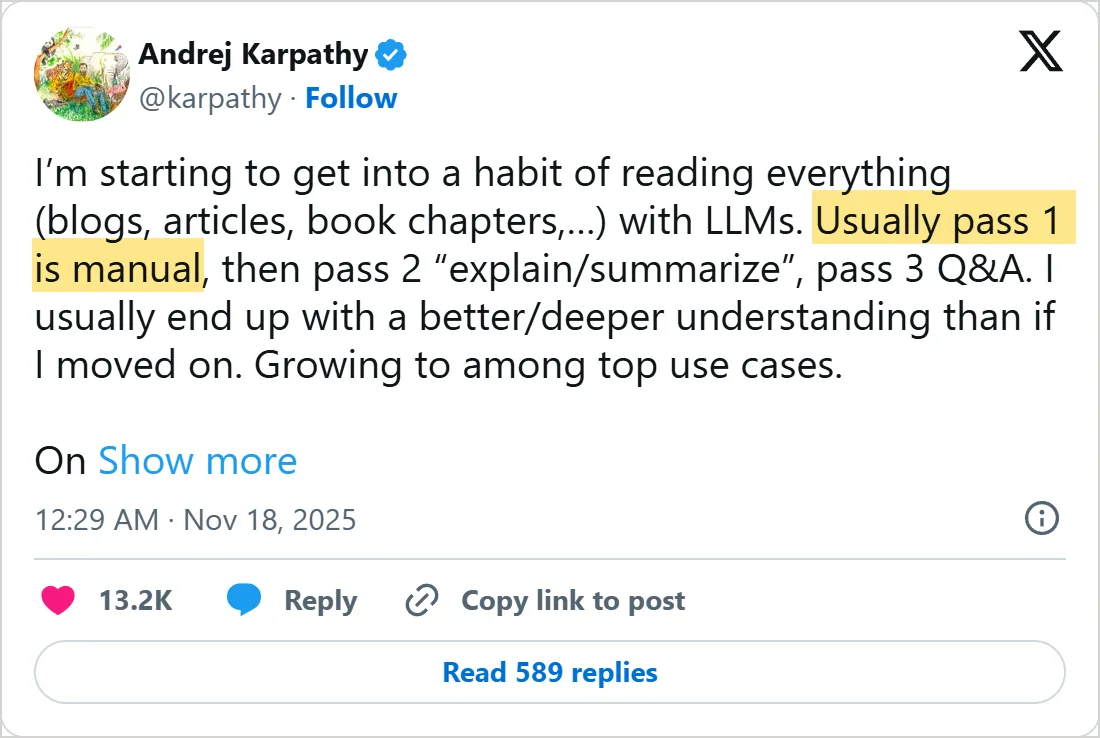
A screenshot of X's own embed of the post, taken on 5 November 2026, with the time in UTC. X cuts the post short with Show more. Select it to open the post on X.
Common mistakes
- Trusting a summary you have not checked. Open three of the pages it cites and find the sentences.
- Uploading a file far past the limits and wondering why the answer is thin. Split it first.
- Asking for "a summary" with no reader and no shape. You get a generic one.
- Trusting the summary of a scan. A scan is the case where checking matters most.
- Uploading a private file to a consumer app because it was quicker. The rules above come first.
Try it yourself
- Take a report you have already read and ask for the summary with quotes and page numbers.
- Compare it with what you remember. Mark anything the summary left out or got wrong.
- Run your last meeting notes through the notes prompt and see where it writes "missing".
- Find your app's file limits in the table and check whether your longest document fits.
Next: spreadsheets
Documents hold words. The next lesson, how to analyze Excel data with AI, handles numbers, where a wrong answer is easier to miss and the check is different.
The habit of asking for quotes comes from the same idea as giving a model context: what you put in front of it is what it works from. What are tokens in AI explains the units behind a window's size.
Check yourself
What should you ask for so you can check a summary?
Show answer
C. The quotes and page numbers it relied on Anthropic says to have the model quote the relevant parts first, and page numbers let you find each quote.
Claude is given a PDF of 150 pages. What does it read?
Show answer
A. Text only Claude reads text and visuals up to 100 pages and text only from 101 to 1,000 pages. Over 1,000 pages the upload fails.
Google's page says a file that is too large can cause what in Gemini?
Show answer
D. Gemini misses details Google says large files can make Gemini miss details, so use smaller files.
Which line in a meeting-notes prompt keeps the app from guessing a task owner?
Show answer
B. If an owner or a date is missing, write "missing" Telling the app what to write when information is absent keeps it from inventing an owner or a date.
Frequently asked questions
Can AI summarize a scanned PDF?
Sometimes. The help pages do not promise that every scan can be read, and Claude's page says it reads the text and visuals of PDFs up to 100 pages. Ask for a quote from the middle of the file and compare it with the page.
How long a PDF can AI summarize?
Claude counts pages and Gemini counts file size, so the two answers differ. The table above has both. Anything near either limit is better split into parts.
What do I do when the document is longer than the limit?
Split it by chapter or section, summarize each part with the same prompt, then paste the part summaries into a new chat and ask for one summary of them. Claude's page also suggests splitting large documents.
Is it safe to upload a confidential contract to an AI app?
Not by default. On the consumer apps, Google says chats can be reviewed by people and used to improve services, and Anthropic says chats are used for training if you opt in. A work account may follow other terms, so ask before you upload.
Can Word summarize a short document?
Yes. Microsoft says automatic summaries need at least 200 words of content, but for a shorter document you can still select Summary at the top of the page to generate one.
Can I summarize several documents at once?
Yes. Attach them together and ask for one summary per file first, then one that combines them. Both apps cap the number of files, as the table shows.
Sources
- Anthropic: Uploading files to Claude https://support.claude.com/en/articles/8241126-uploading-files-to-claude
- Google: Upload and analyze files in Gemini Apps https://support.google.com/gemini/answer/14903178?hl=en
- Microsoft: Create a summary of your document with Copilot in Word https://support.microsoft.com/en-us/office/create-a-summary-of-your-document-with-copilot-79bb7a0a-3bf7-41fe-8c09-56f855b669bf
- Google: Gemini Apps Privacy Hub https://support.google.com/gemini/answer/13594961?hl=en
- Anthropic: Consumer model training https://privacy.claude.com/en/articles/10023580-consumer-model-training
- Anthropic: Prompting best practices https://platform.claude.com/docs/en/build-with-claude/prompt-engineering/claude-prompting-best-practices
- Andrej Karpathy (@karpathy) on X: reading with LLMs https://x.com/karpathy/status/1990577951671509438
- Andrej Karpathy: personal site https://karpathy.ai/