
Huashu Design
alchaincyf · Skill
Turns a one-line request in your AI agent into a finished design: a launch animation, a clickable app prototype, an editable slide deck, an infographic or a se…
New29.4k
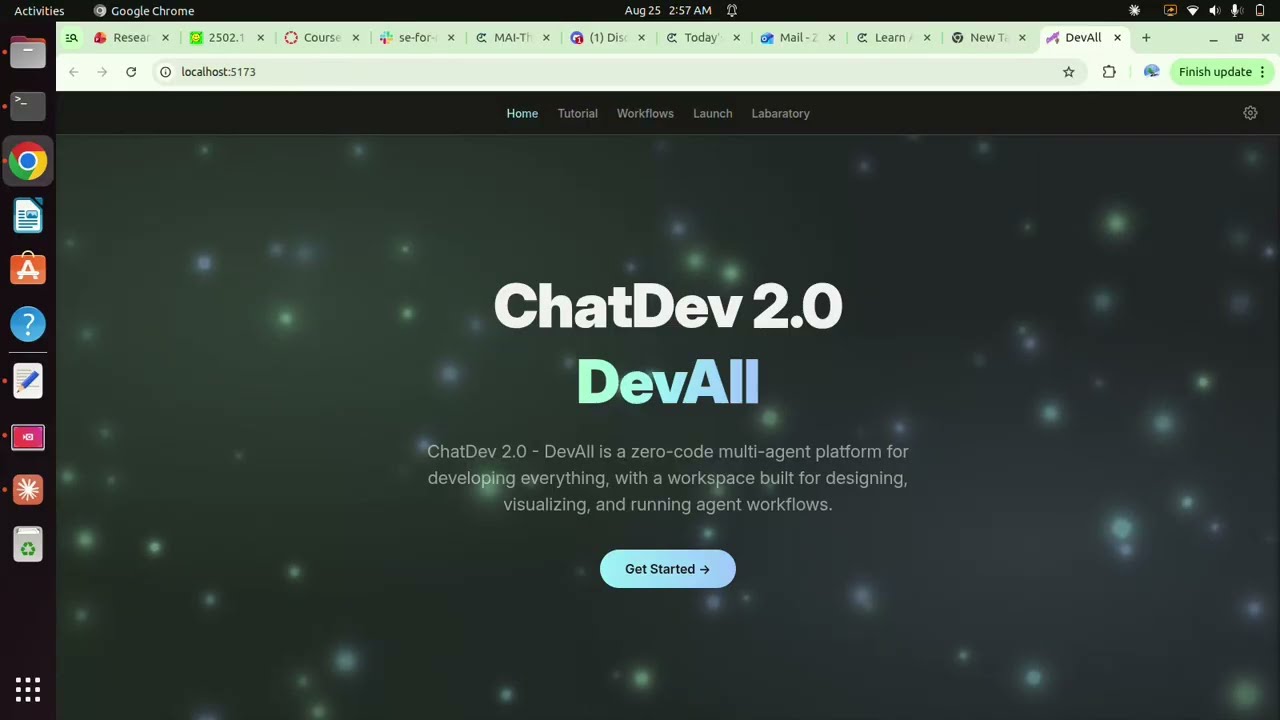

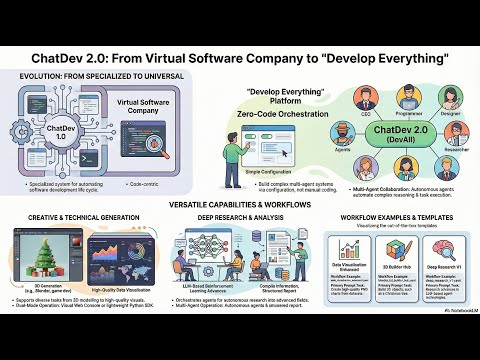


OpenBMB’s open-source platform for building multi-agent systems without code, in version 2.0 also called DevAll. You draw or write a workflow of LLM agents, then run it from a web console, Python or OpenClaw on your own computer.
ChatDev is an open-source project on GitHub in the Developer category, listed by Mindket. It is free. This is version 2, last updated on . Install it from GitHub as its README says. Get Mindket’s setup notes on your Mindket account, as a zip.
uv sync
cd frontend && npm install
ChatDev 2.0, which OpenBMB also calls DevAll, is a platform for building and running multi-agent systems without writing code. You describe the agents, the links between them and the task in a YAML workflow, or draw the same graph on a canvas, then launch it with a prompt. It runs on your own computer as a FastAPI backend with a Vue 3 web console, and the same workflows run from Python. ChatDev started in 2023 as a virtual software company, where agents such as a CEO, a CTO and a Programmer took a program through design, coding, testing and documentation. That version now lives on its own branch. This listing is Mindket’s setup notes for 2.0.
People who want a team of LLM agents on a job such as a research report, a set of charts or a small game, without writing the orchestration code. Python developers get the same workflows through the Python SDK, which the README offers for automation and batch processing: runtime.sdk inside a clone, or the chatdev package on PyPI. Researchers in multi-agent collaboration will find the group’s papers behind it. MacNet and the puppeteer orchestrator from its NeurIPS 2025 paper each have a branch in the repository.
| Industry | Who uses it | How they use it | Example |
|---|---|---|---|
| Data and analytics | Analysts | Upload a dataset and run a data visualization workflow | The README’s case asks for four to six PNG charts from a large real-estate transactions dataset. |
| Research | Researchers and writers | Run deep_research_v1.yaml, whose tools search the web, save sources and write a report in chapters | The README’s case asks about recent advances in LLM-based agent RL. |
| Games and software | Developers | Run ChatDev_v1.yaml, a full workflow the README lists under game development | The README’s case asks for a Tank Battle game. |
| 3D work | People who use Blender | Run a Blender builder workflow, which needs Blender and blender-mcp | The README’s case asks it to build a Christmas tree. |
| Teaching | Teachers and course makers | Run teach_video.yaml, which renders a Manim video, after uv add manim and with MAC_ALLOW_UNSAFE_CODE_EXECUTION=1 in .env | The README’s case asks, in Chinese, what convex optimization is. |
The Manim, Blender and ChatDev_v1.yaml workflows run code, using Manim scripts, a local blender-mcp server and uv tools. The Python node page puts all three behind MAC_ALLOW_UNSAFE_CODE_EXECUTION=1, which is off by default.
Skip it if you want a hosted app with nothing to install: 2.0 is a backend and a console you start yourself. For the 1.0 software company as it was, use the chatdev1.0 branch, which these notes do not cover.
In your browser, on the web console your own machine serves at localhost:5173. The README names macOS, Linux, WSL and Windows.
Get it saves a zip of Mindket’s setup notes in your downloads folder, with each route’s commands from OpenBMB’s README and docs. The README’s recommended route is make, run from a clone of the repository.
| Need | Detail |
|---|---|
| Python | 3.12. The README says 3.12 or newer, but pyproject.toml accepts only 3.12 |
| Node.js | 20.19 or newer, for the web console. The README says 18 or newer, but the console’s package.json uses Vite 7 (vite ^7.1.7), which needs Node.js 20.19+ or 22.12+ |
| uv | The package manager that installs and runs the backend |
| A model provider | An API key and base URL for OpenAI, Gemini or another provider, or a local LM Studio or Ollama server |
| make | For make dev, make validate-yamls and make stop. The README also gives the two start commands separately |
uv sync
cd frontend && npm install
Back in the project root, copy the settings file and start both servers.
cp .env.example .env
make dev
Without make, start the backend with uv run python server_main.py --port 6400 --reload. Then run the console from frontend/ with VITE_API_BASE_URL=http://localhost:6400 npm run dev. The Makefile’s own client target runs that line through npx cross-env. If the console cannot reach the backend, port 6400 may be taken: start the backend with --port 6401 and set VITE_API_BASE_URL=http://localhost:6401 for the console, which stays at localhost:5173. With Docker and Docker Compose, one command from the project root builds and starts both.
docker compose up --build
On the Launch tab, choose a workflow from the left panel, upload any files it needs, type your task and click Launch. Each node moves from pending to running to success or failed. The output panel shows live logs, each node’s output and the files the run makes. When a run reaches a human node it stops and asks for text or a file. Download, on the right panel, saves the whole session with context.json, attachments and logs.
The ready workflows sit in yaml_instance/. Files named demo_*.yaml each show one feature, such as memory, MCP or loops, and the plainly named ones are full workflows. To make your own, draw nodes and edges on the Workflow Workbench and export the YAML, or write it by hand and check every file.
make validate-yamls
From Python, the PyPI package runs a workflow file and hands back the result. Its page gives the install under “From the repository root”, so run this inside a clone.
from chatdev import run_workflow

result = run_workflow(
    yaml_file="ChatDev_v1.yaml",
    task_prompt="This is a minimal run example",
)

print(result.success)
print(result.final_message)
print(result.output_dir)You want an article drafted, with the last word yours. You save the authoring guide’s example workflow as a file in yaml_instance/ and set its BASE_URL under vars to your provider. Change its name: gpt-4o to a model your provider serves, with provider: gemini for Gemini, as the agent node page shows. If it is not in the Launch list, run make sync, which the README says uploads all workflow files from yaml_instance/ to the database. It has an Article Writer agent and a Human Reviewer node. On the Launch tab you pick it and type a short phrase, as its instruction asks:
Remote work for small teams
Article Writer drafts the piece on your model, then the run stops at Human Reviewer and the page asks for your input. Type revision notes and the draft goes back to the writer for another pass. Type ACCEPT and the loop ends, because the edge back to the writer fires only when ACCEPT is missing. The session folder keeps context.json, with what each node took in and gave back.
If you are new. A multi-agent system splits one job between several model calls with different roles, one writing and one reviewing, and passes text between them. ChatDev 2.0 lets you set that up as a graph instead of code. Start with the console’s Tutorial, then a demo workflow, then a full one. Every agent node calls your provider at least once, and tools, reflection, retries, loops and dynamic runs add more calls, so a hosted model bills each one. LM Studio or Ollama keep the calls on your own computer.
For experts. Graphs without cycles run as ordinary DAGs. For loops, the engine finds the cycles with Tarjan’s algorithm and runs each one as a super node, recursing into nested ones. loop_counter and loop_timer nodes cap a loop by count or by time. An edge can carry a condition, a keyword match or a Python function in functions/edge/, and a process step such as regex_extract. Dynamic execution fans a message out in map mode, or in tree mode reduces the results in groups until one is left. Up to ten units run at once by default. The authoring guide puts the dynamic block on a node and the dynamic execution page on an edge, so check demo_dynamic.yaml before you copy either.
Variables resolve from vars in the YAML first, then the shell, then .env, and a missing one raises a ConfigError with its path. Agent nodes make up to five attempts at a failed call, the first included, waiting 1 to 6 seconds between tries, on 408, 409, 425, 429, 500, 502, 503 and 504. Tools come from Python functions in functions/function_calling/, typed by their hints, or from MCP servers, remote over HTTP or local over stdio. Memory stores are simple, file, blackboard or Mem0. From a terminal, the guide gives this line, which takes the task from TASK_PROMPT or a prompt it shows. The folder holds no demo.yaml, so point --path at a demo_*.yaml file such as demo_human.yaml.
python run.py --path yaml_instance/demo.yaml --name test_run
ChatDev runs on your machine, and these are the parts that reach further.
This kit holds setup notes only. Mindket wrote them. ChatDev itself, its workflow files and its documentation come from OpenBMB's repository: https://github.com/OpenBMB/ChatDev
These notes are not made or endorsed by OpenBMB. The README calls ChatDev 2.0 (DevAll) "A Zero-Code Multi-Agent Platform for Developing Everything" and says users can "define agents, workflows, and tasks" through simple configuration. The documentation starts at https://github.com/OpenBMB/ChatDev/blob/HEAD/docs/user_guide/en/index.md
The notes cover ChatDev 2.0 on the main branch. The README says the classic ChatDev 1.x, a virtual software company with CEO, CTO and Programmer agents, moved to the chatdev1.0 branch (https://github.com/OpenBMB/ChatDev/tree/chatdev1.0). These notes do not cover it.
The notes come from the README and the documentation pages named in each file. They were not checked against the source code.
Apache-2.0. The LICENSE file (https://github.com/OpenBMB/ChatDev/blob/HEAD/LICENSE) is the standard Apache License 2.0 text, and its appendix reads "Copyright 2025 OpenBMB".
ChatDev 2.0 is a backend you run yourself (FastAPI, started with server_main.py) with a Vue 3 web console in front of it. You describe a multi-agent system as a YAML workflow, or draw it on the console's canvas, and launch it with a task prompt. The documentation gives these ways to run it and to reach it:
uv and npm installs, the .env file, make dev and the manual start commands.compose.yml.API_KEY and BASE_URL, the example providers, optional search keys and the code-execution switch.chatdev package on PyPI and the in-repo run_workflow.uv as the package manager. The README says Node.js "18+", but the frontend's package.json uses Vite 7 (vite ^7.1.7), which needs Node.js 20.19+ or 22.12+. The README names macOS, Linux, WSL and Windows. Sources: https://github.com/OpenBMB/ChatDev/blob/HEAD/README.md and https://github.com/OpenBMB/ChatDev/blob/HEAD/frontend/package.jsonpyproject.toml says requires-python = ">=3.12,<3.13", which is narrower than the README's "3.12+". Source: https://github.com/OpenBMB/ChatDev/blob/HEAD/pyproject.tomlAPI_KEY and BASE_URL in a .env file. The example file lists OpenAI, Gemini, LM Studio and Ollama.The README gives these steps for a local run. The full steps are in setup/local-install.md.
uv synccd frontend && npm installcp .env.example .envmake devThen open http://localhost:5173. Source: https://github.com/OpenBMB/ChatDev/blob/HEAD/README.md
The .env.example file ships MAC_ALLOW_UNSAFE_CODE_EXECUTION=0 and says "Disabled by default. Enable only for trusted workflows; this is not a sandbox." The Python node page says the same switch covers Python nodes, code_save_and_run, execute_code, uv tools, Manim scripts and local MCP server processes. Source: https://github.com/OpenBMB/ChatDev/blob/HEAD/.env.example and https://github.com/OpenBMB/ChatDev/blob/HEAD/docs/user_guide/en/nodes/python.md
Some file names in the docs do not match the repository. The README's SDK snippet and the authoring guide's CLI line both use yaml_instance/demo.yaml, and the README's workflow table names GameDev_v1.yaml, data_visualization_enhanced.yaml and blender_scientific_illustration.yaml. The yaml_instance/ folder held none of these on 2026-11-03. Point each command at a file that is there. setup/web-console-and-workflows.md lists the nearest names.
The pages these notes use give no update or uninstall steps. The Makefile has make stop, which runs npx kill-port 6400 and npx kill-port 5173 to end both servers. Each run writes its output to WareHouse/<session>/ inside the project folder. The attachment guide says every attachment is kept after a run unless you set MAC_AUTO_CLEAN_ATTACHMENTS=1, which deletes only the attachments/ folder, and that downloading a session zip does not delete the originals. Sources: https://github.com/OpenBMB/ChatDev/blob/HEAD/Makefile and https://github.com/OpenBMB/ChatDev/blob/HEAD/docs/user_guide/en/attachments.md
README.md  7 KB
setup/docker.md  3 KB
setup/http-api-and-cli.md  4 KB
setup/local-install.md  4 KB
setup/models-and-keys.md  4 KB
setup/openclaw.md  2 KB
setup/python-sdk.md  5 KB
setup/tools-memory-and-mcp.md  7 KB
setup/web-console-and-workflows.md  7 KB
Updated by Mindket to the current version of this kit.
Posts and comments that name this project on Hacker News, Bluesky, X, Reddit, Facebook and YouTube, found by a weekly search and on Trendshift. Mindket doesn’t write or check them. Open one to read it where it was posted.
alchaincyf · Skill
Turns a one-line request in your AI agent into a finished design: a launch animation, a clickable app prototype, an editable slide deck, an infographic or a se…
op7418 · Skill
Skill that makes single-file HTML slide decks, slide illustrations and platform covers in two visual styles, with a presenter mode for rehearsal. For speakers…
alirezarezvani · Skill
Adds 411 ready-made skills for Claude Code and other coding agents, grouped by role from engineering and product to marketing, finance and compliance. Installs…
block · Kit
Self-hostable workspace where people and AI agents share the same rooms, built on a Nostr relay that logs every action as a signed event. For teams that want t…
backnotprop · Kit
Opens your AI coding agent's plans, specs and code changes in a browser so you can annotate or comment on them and send the feedback straight back to the agent.
alibaba · Kit
Reviews Git changes with an AI agent that reads files and searches the codebase, then writes comments tied to exact lines. It suits developers who want automat…