
Create a skill in six steps
Start with a job you keep explaining to the agent by hand. The sample below, written for this guide, turns one of those jobs, reviewing SQL migration files, into a skill for Claude Code. A rule for every task belongs in CLAUDE.md instead, which Claude Code loads at the start of every session.
Write the description before the body. Until a request matches, an agent reads only a skill's name and description. Say what the skill does and when to use it, in the third person: Anthropic's authoring guide asks for that because the description is injected into the system prompt.
---
name: reviewing-sql-migrations
description: Reviews SQL migration files for steps that drop data or cannot be rolled back. Use when the user adds or edits a migration or asks whether a schema change is safe.
---

# Reviewing SQL migrations

1. Run scripts/changed_migrations.sh to list the migration files changed on this branch.
2. Read each file in full. Note every DROP, every RENAME, every column type change and every NOT NULL added to an existing column.
3. For each one, say what happens to rows that already exist and whether the step can be undone.
4. For how our database locks tables during a migration, read references/locks.md.
5. Finish with a table: file, risky step, why it matters, suggested fix.

## Gotchas

- Migrations live in db/migrations/. Never edit one that has already shipped. Write a new migration instead.
- Some old migrations have no down step. Mention it once, then move on.
- Make the folder. For a skill in every project, run
mkdir -p ~/.claude/skills/reviewing-sql-migrations. For one repository only, create.claude/skills/reviewing-sql-migrationsinside it. - Save the file above as
SKILL.mdin that folder. Itsnamehas to match the folder's name. - Write the body as numbered steps, say what output you expect, and end with a Gotchas list of facts the agent would get wrong unless told.
- Add
scripts/changed_migrations.shandreferences/locks.md, the two files the body points to, if your skill needs them. - Check the frontmatter. In Claude Code v2.1.233 and later,
claude plugin validate ~/.claude/skillsfinds SKILL.md files whose YAML doesn't parse. The reference toolskills-ref validate ./reviewing-sql-migrationschecks one folder against the specification. - Ask Claude Code for the task in your own words, say "Is this migration safe to merge?", then run
/reviewing-sql-migrationsto call the skill by name.
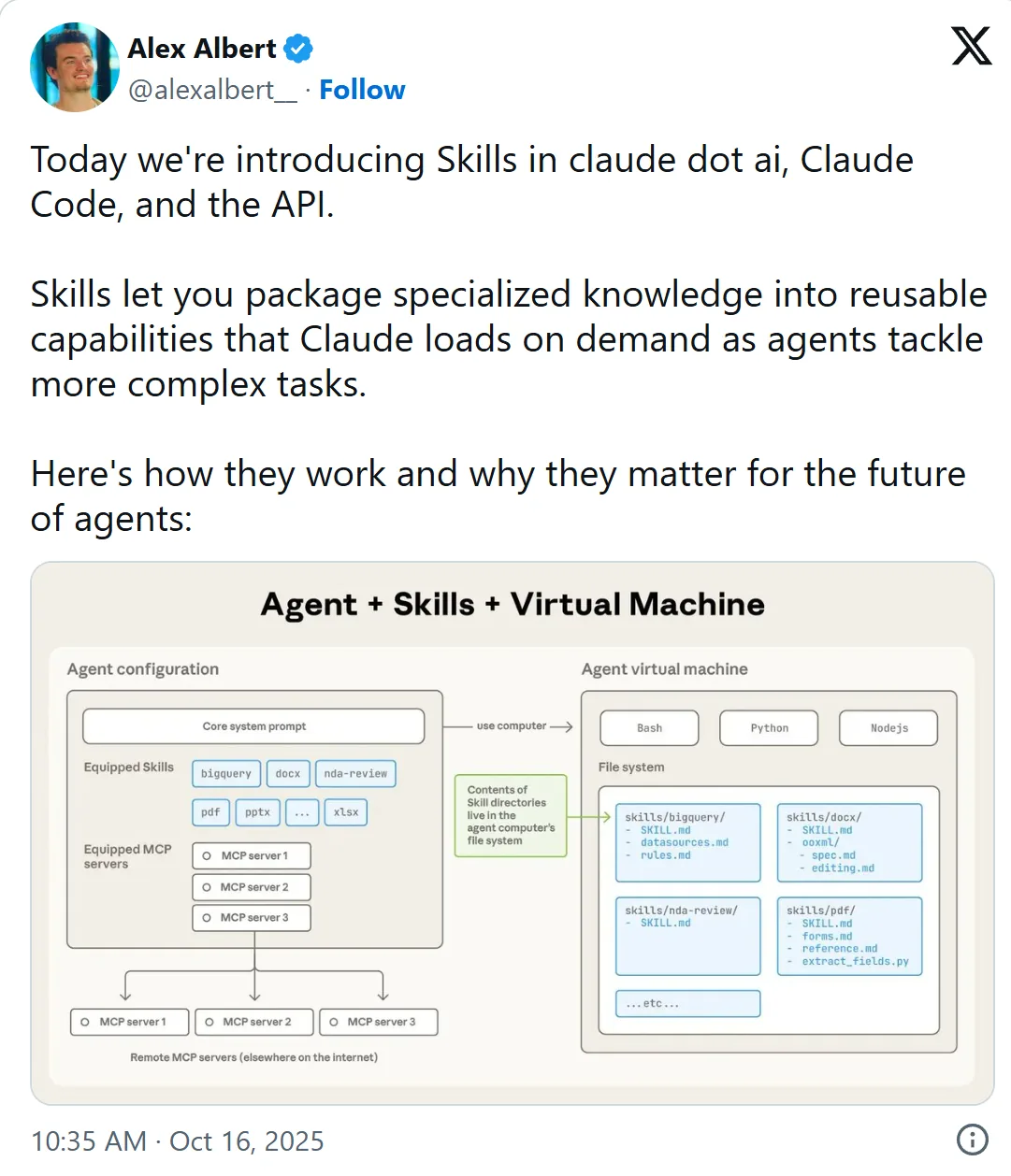
X's own embed of the post, captured on 3 November 2026 with the time in US Pacific time. Select it to open the post on X.
Frontmatter limits that change by product
Anthropic's help article caps a description at 200 characters for Claude.ai uploads, against 1,024 in the open specification.
The sample's name, reviewing-sql-migrations, is a gerund, like the processing-pdfs that Anthropic's guide suggests over a vague helper or utils.
Claude Code also reads a few fields of its own, listed in its skills documentation. With disable-model-invocation: true, the skill runs only when you type its command. allowed-tools lets it use the listed tools without asking, during the turn that invokes it.
| Rule | Applies to | Source |
|---|---|---|
name: up to 64 lowercase letters, numbers and hyphens, the same as the folder name | Every agent that follows the open specification | Agent Skills specification |
name without the words anthropic or claude, and no XML tags in either field | Claude | Anthropic's skill authoring guide |
description: up to 1,024 characters | The open specification | Agent Skills specification |
description and when_to_use together: cut at 1,536 characters in the skill listing | Claude Code | Claude Code skills documentation |
description: up to 200 characters | Uploads to Claude.ai | Claude Help Center |
description and when_to_use together are cut.Sources: Claude Help Center: How to create custom Skills (read November 3, 2026), Agent Skills specification (read November 3, 2026), Claude Code docs: Skills (read November 3, 2026)
What to write in the body, and where scripts go
Claude Code adds a skill's text to the conversation once, when the skill is invoked, and doesn't re-read the file on later turns. So a rule has to cover the whole task. Write "Run the tests after every edit", not "Run the tests".
After a long session is compacted, Claude Code may keep only the start of an invoked skill. Put the steps that must survive at the top of SKILL.md and the background lower down.
Whether Claude runs a script or reads it depends on how SKILL.md words the line. In Anthropic's guide, "Run analyze_form.py to extract fields" means execute it, while "See analyze_form.py for the extraction algorithm" means read it. Paths take forward slashes, even on Windows, because backslashes cause errors on Unix systems.
The sample's paths start from the skill's folder. In Claude Code, ${CLAUDE_SKILL_DIR}/scripts/changed_migrations.sh also resolves wherever the skill sits, plugins included.
reviewing-sql-migrations/
├── SKILL.md
├── scripts/
│   └── changed_migrations.sh
└── references/
└── locks.mdWhere Claude Code finds your skill
With a deploy skill in both ~/.claude/skills/ and the project's .claude/skills/, typing /deploy runs your personal one, and an enterprise skill of the same name would beat both. Plugin skills never clash, because the plugin's name comes first.
Claude Code watches ~/.claude/skills/ and the project's .claude/skills/, so adding, editing or removing a skill there needs no restart. The exception is a top-level skills folder that didn't exist when the session started. Run /reload-skills to pick that one up.
| Scope | Where SKILL.md goes |
|---|---|
| Enterprise | .claude/skills/my-skill/SKILL.md in the managed settings directory |
| Personal | ~/.claude/skills/my-skill/SKILL.md |
| Project | .claude/skills/my-skill/SKILL.md |
| Nested | some-folder/.claude/skills/my-skill/SKILL.md inside the project |
| Added directory | .claude/skills/my-skill/SKILL.md in a folder passed with --add-dir |
| Plugin | my-plugin/skills/my-skill/SKILL.md |
Test that it triggers, and that it stays quiet
What skills are available? confirms that Claude Code sees the skill. If your plain-words request loaded nothing while /reviewing-sql-migrations worked, the skill is fine and the match is what failed.
The same request can fire a skill on one run and miss on the next. So the Agent Skills guide to descriptions suggests about 20 test prompts, 8 to 10 that should trigger the skill and 8 to 10 that shouldn't, each run several times. A should-trigger prompt passes when it fires in more than half its runs. Run the set on every model you plan to use, since Anthropic's authoring guide warns that what works for Opus may need more detail for Haiku.
For the negatives, pick near-misses. With the sample, "write a migration that adds an index" shares the skill's words but asks for writing, not a review.
20
queries in a test set, about 8 to 10 that should trigger the skill and 8 to 10 that should not
Source: Agent Skills: Optimizing skill descriptions (read November 3, 2026)
3
runs of each query is a reasonable starting point, since one query can fire the skill on one run and miss on the next
Source: Agent Skills: Optimizing skill descriptions (read November 3, 2026)
60
invocations from 20 queries at 3 runs each, which the guide says you will want to script
Source: Agent Skills: Optimizing skill descriptions (read November 3, 2026)
40%
of the queries set aside as a validation set, used only to check that your edits generalize
Source: Agent Skills: Optimizing skill descriptions (read November 3, 2026)
- Runs by name but never by itself: if the YAML doesn't parse, Claude Code still loads the body with empty metadata, so Claude has no description to match. Start Claude Code with
--debugto see the parse error. - Misses: Claude Code's troubleshooting list starts with whether the description holds the words users would say. Widen it to the kind of request, not the words of the prompts that failed.
- Fires too often: narrow the description, or add
disable-model-invocation: true. - Fires on the wrong requests: say what the skill doesn't do, such as writing a new migration, and where a neighboring skill takes over.
Frequently asked questions
Does a skill need a name field in Claude Code?
Claude Code doesn't require one. It treats every frontmatter field as optional, takes the name from the folder and recommends only a description. Without one, it uses the first non-empty line of the body. The open specification is stricter and requires both.
How do I check that a skill improves the output, not just that it fires?
Run the same tasks with and without the skill, then compare. For a skill inside a plugin, claude plugin eval runs your test cases both ways and scores the difference. Anthropic's skill-creator has a benchmark mode too, setting pass rate, time and tokens with the skill against the same figures without it.
How do I make a rule in a skill hold every time?
Move it into a hook, which Claude Code runs every time its event occurs, such as before each file edit, whether or not Claude is following the skill. A skill can declare its own hooks in a hooks frontmatter field, active from the moment it is invoked until the session ends.
Can Claude write the skill for me?
Claude handles the skill format natively, Anthropic says, so you can ask it to turn a task you just finished into a skill. Its guide pairs two instances: one writes and refines the skill, and a fresh one with the skill loaded tries it on real tasks. Whatever the second one misses goes back to the first.
Why is my skill's description cut short in Claude Code?
The skill listing ran out of room. Claude Code fits every description into a budget of 1% of the context window and drops the least-used skills' descriptions first. Raise it with the skillListingBudgetFraction setting, or list rarely used skills as "name-only" in skillOverrides.
Will the same skill work in VS Code or Codex?
Usually, since the Agent Skills quickstart says the same skill works in any compatible agent, Claude Code and OpenAI Codex included. Its VS Code example reads skills from .agents/skills/. Watch allowed-tools, though: the specification marks it experimental, and support varies between agents.
Sources
- Agent Skills specification https://agentskills.io/specification
- Agent Skills: Quickstart https://agentskills.io/skill-creation/quickstart
- Agent Skills: Optimizing skill descriptions https://agentskills.io/skill-creation/optimizing-descriptions
- Claude Platform docs: Skill authoring best practices https://platform.claude.com/docs/en/agents-and-tools/agent-skills/best-practices
- Claude Code docs: Skills https://code.claude.com/docs/en/skills
- Claude Code docs: Create a Claude Code plugin https://code.claude.com/docs/en/plugins/create
- Claude Code docs: Manage costs effectively https://code.claude.com/docs/en/costs
- Claude Help Center: How to create custom Skills https://support.claude.com/en/articles/12512198-how-to-create-custom-skills
- Alex Albert on X: introducing Skills in claude.ai, Claude Code and the API https://x.com/alexalbert__/status/1978877498411880550