
Huashu Design
alchaincyf · Skill
Turns a one-line request in your AI agent into a finished design: a launch animation, a clickable app prototype, an editable slide deck, an infographic or a se…
New29.4k
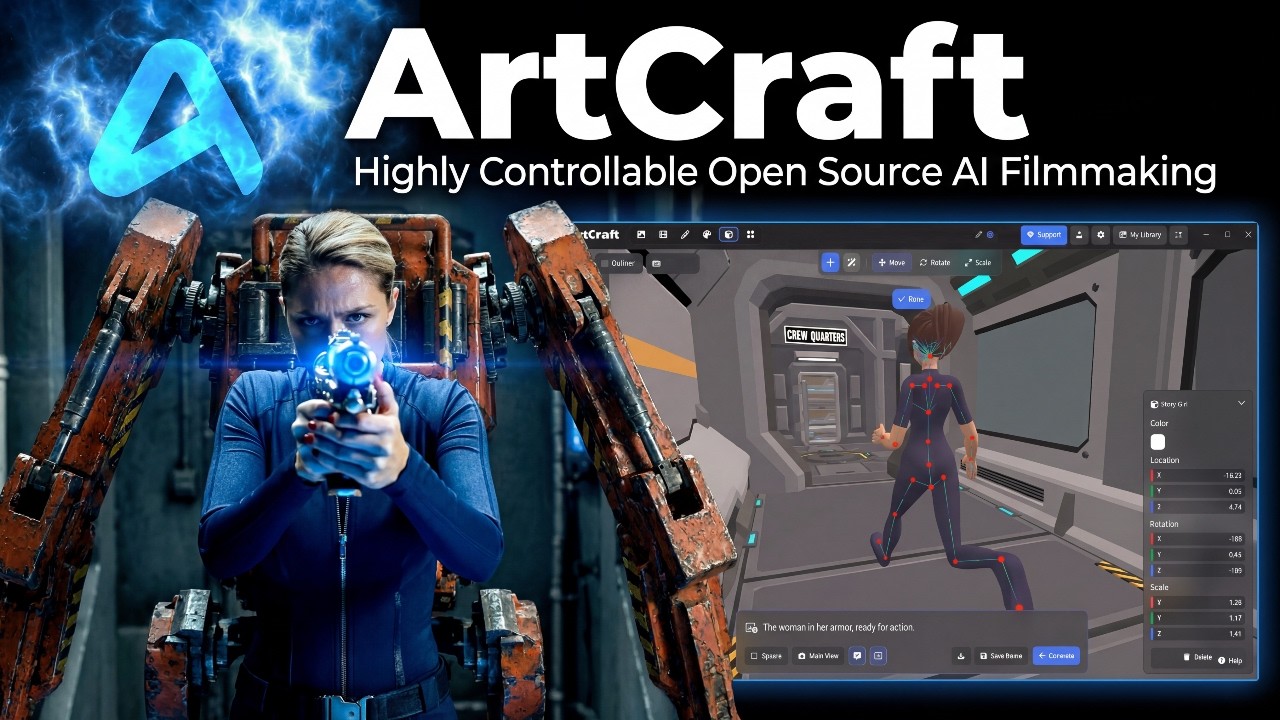


A studio for making AI images and video where you compose in 2D, stage scenes in 3D and pick the model, so you control the framing before anything is generated. Made for artists, designers and filmmakers.
artcraft is an open-source project on GitHub in the Productivity category, listed by Mindket. It is free. This is version 1, last updated on . Install it from GitHub as its README says. Get Mindket’s setup notes on your Mindket account, as a zip.
git clone https://github.com/storytold/artcraft.git
cd artcraft
ArtCraft is an app for making AI images and video, and its authors call it an IDE for that work. You compose a shot in 2D, stage the scene in 3D, and choose the model that fits the job. The aim is precise results you can repeat, instead of retyping prompts until one works.
Artists, designers and filmmakers who want to decide the framing, the look of their characters and where the camera sits will get the most from it.
| Industry | Who uses it | How they use it | Example |
|---|---|---|---|
| Film and video | Filmmakers | Stage a scene in 3D and place the camera before generating | A shot framed exactly where the director wants it |
| Design | Designers | Lay out a picture in 2D, then generate from that layout | A key visual with each element in a set position |
| Illustration | Artists | Pick the model that suits a style | A scene where a character keeps the same look |
If you only want to type one line and take whatever comes back, a lighter tool will do.
| Use case | Who | What they get back |
|---|---|---|
| Planning a shot | Filmmakers | A staged 3D scene with the camera placed before generation |
| Composing an image | Designers | A 2D layout that guides what the model draws |
| Keeping a look steady | Artists | Results you can repeat instead of a new surprise with each prompt |
Run these in a terminal:
# Copy the project to your computer
git clone https://github.com/storytold/artcraft.git
# Go into its folder
cd artcraft
You want a shot of a character walking into a room. You place the character and the camera on the 3D stage, pick a model, and generate. The image or video that comes back follows the scene you built.
Most AI image tools start with a text box and leave the framing to chance. ArtCraft puts a canvas and a 3D stage in front of the generate step, so you decide where things go first. A good first try is to lay out one simple scene and generate it with a single model.
If you know the field, the project calls itself an IDE for AI image and video work that you steer as you go. It joins 2D layout, 3D staging and a choice of models, so you can fix the framing, the characters and the camera position yourself. You do more work before each generation than with a plain prompt box.
A studio for making AI images and video where you compose in 2D, stage scenes in 3D and pick the model, so you control the framing before anything is generated. Made for artists, designers and filmmakers.
Made by storytold on GitHub. These notes are Mindket's, written from its README; the project's own files and license are in its repository.
What it is: ArtCraft is an app for making AI images and video, and its authors call it an IDE for that work. You compose a shot in 2D, stage the scene in 3D, and choose the model that fits the job. The aim is precise results you can repeat, instead of retyping prompts until one works.
Who it suits: Artists, designers and filmmakers who want to decide the framing, the look of their characters and where the camera sits will get the most from it.
Industry | Who uses it | How they use it | Example
Film and video | Filmmakers | Stage a scene in 3D and place the camera before generating | A shot framed exactly where the director wants it
Design | Designers | Lay out a picture in 2D, then generate from that layout | A key visual with each element in a set position
Illustration | Artists | Pick the model that suits a style | A scene where a character keeps the same look
If you only want to type one line and take whatever comes back, a lighter tool will do.
Where to use it:
Use case | Who | What they get back
Planning a shot | Filmmakers | A staged 3D scene with the camera placed before generation
Composing an image | Designers | A 2D layout that guides what the model draws
Keeping a look steady | Artists | Results you can repeat instead of a new surprise with each prompt
How to set it up:
Example: You want a shot of a character walking into a room. You place the character and the camera on the 3D stage, pick a model, and generate. The image or video that comes back follows the scene you built.
For newcomers and experts: Most AI image tools start with a text box and leave the framing to chance. ArtCraft puts a canvas and a 3D stage in front of the generate step, so you decide where things go first. A good first try is to lay out one simple scene and generate it with a single model.
If you know the field, the project calls itself an IDE for AI image and video work that you steer as you go. It joins 2D layout, 3D staging and a choice of models, so you can fix the framing, the characters and the camera position yourself. You do more work before each generation than with a plain prompt box.
Compose the picture in 2D
Stage the scene in 3D
Choose a model
Generate from the staged scene
Good to know:
git clone https://github.com/storytold/artcraft.gitThen follow the setup in its README. Nothing in this kit runs by itself.
README.md 4 KB
Posts and comments that name this project on Hacker News, Bluesky, X, Reddit, Facebook and YouTube, found by a weekly search and on Trendshift. Mindket doesn’t write or check them. Open one to read it where it was posted.
alchaincyf · Skill
Turns a one-line request in your AI agent into a finished design: a launch animation, a clickable app prototype, an editable slide deck, an infographic or a se…
op7418 · Skill
Skill that makes single-file HTML slide decks, slide illustrations and platform covers in two visual styles, with a presenter mode for rehearsal. For speakers…
alirezarezvani · Skill
Adds 411 ready-made skills for Claude Code and other coding agents, grouped by role from engineering and product to marketing, finance and compliance. Installs…
zarazhangrui · Skill
Builds HTML presentations from scratch or from a PowerPoint file and shows visual style previews to pick from, for people who want web slides with no CSS or Ja…
iptv-org · Kit
Collects publicly available live TV channels from many countries into playlists that any video player with live streaming can open. Made for viewers and for de…
uwg · Kit
Holds a set of image upscaling models gathered from the OpenModelDB community, for people who want to enlarge low-resolution pictures with AI on their own comp…